Bringing Security and Data In House
Nov 13, 2026 · Yoonsun Lee
Also in the ECC Rust Book: Bringing security and data in house · Function gating across clouds · Parsing at the gate: Shopify and Webflow
Related knowledge base: Key Management Lifecycle · Signing Keys by Proxy · Keys to the Castle · Rotate a Key in Three Steps · Channel Publish
Introduction: layers of security, not just login
SAP, WordPress and Magento all secure data the same way: at sign-in, by role. Once a user is signed in, their role decides what they can do, and nothing is checked again.
| System | Role model | Checked | What it doesn't cover |
|---|---|---|---|
| SAP ECC / S/4HANA | Roles built in PFCG from authorization objects (S_TABU_DIS for tables, F_KNA1_BUK for customers by company code) | At login and when a transaction starts | Data read through RFC, IDoc or a direct database connection. A role with table access sees every row in clear text |
| WordPress | Roles and capabilities (administrator, editor, current_user_can('edit_posts')) | At login, then per action against the role | Any plugin with database access, and the wp_users / wp_usermeta tables in a database dump |
| Magento / Adobe Commerce | Admin roles with ACL resources (Magento_Customer::manage), plus integration tokens | At admin login and per controller | Customer and order tables are readable by any extension, any integration token with the resource, and any copy of the database |
Login is a door, not a vault. If one session is stolen, one token leaks, one plugin is compromised or one database dump is copied, every row that role could see is exposed. Penetration tests and breach reports on all three platforms come back to this point: the role was right, but nothing checked the request or the data after sign-in.
The layers in this chapter reinforce the login rather than replace it. Each one checks something different, so a failure in one is caught by the next:
 1  Edge          WAF rules, rate limits, Turnstile        → is this a person, from a sane place, at a sane rate?
 2  Request       HMAC signature, session-token JWT        → did Shopify / Webflow / our own app really send it?
 3  Login + role  SAP role, WP capability, Magento ACL,    → who is this, and what may their role do?
                  CRM Sync entitlement
 4  Rule          RuBAC: consent, region, purpose, time    → may THIS action happen to THIS record, right now?
                  checked on every change, not once
 5  Row           per-row encryption (kid), signature,     → if the database leaks, is each row still unreadable,
hash chain and is any edit detectable?- Rules (layer 4) are role-based access turned into rule-based access: the decision is made for each request and each record, using facts the role can't know, such as this customer's consent, this market's law and this export's purpose. See RuBAC compared with perimeter login.
- Row-based encryption (layer 5) means each sensitive row is encrypted with a data key named by its
kid, and signed and chained to the row before it. An administrator, an integration or a database dump without the key gets ciphertext. A changed row breaks the chain. Rotating a key re-encrypts rows a batch at a time, without taking the table offline. The Xano examples below (consent_records,entitlement_signing_keys, JWE) are this layer.
SAP, WordPress and Magento keep their own logins and roles. The layers sit in front of them (edge, request) and behind them (rule, row), so a stolen login alone no longer reaches the data.
Keys at every layer
Every gate in this book trusts one thing: a key. This chapter lists the keys in the CRM Sync stack and what each one signs or proves, along with where it is kept, how it is checked and how it rotates. It covers Xano's working examples, the signing keys Shopify and Webflow use for apps and Designer Extensions, and the Cloudflare layer in front of them all (Workers, Turnstile and the WAF).
 Visitor / bot           Cloudflare edge                         Apps and systems of record
 ─────────────           ─────────────────────────────────       ──────────────────────────
 browser form   ──▶  WAF rules ─▶ Turnstile ─▶ Worker  ──▶  Xano (env keys, signed ledger)
 Shopify        ──▶  webhook HMAC / session token JWT  ──▶  Shopify Admin API (IP allowlist)
 Webflow        ──▶  webhook signature / Designer idToken ─▶  Webflow Data API (site token)
                     └── each hop checks a key; none of them reuses another's ──┘
Three rules hold throughout. A key is generated, not typed (openssl rand -hex 32 or the platform's own "create secret"). It lives in one secret store per runtime: Worker secrets, Xano environment variables, or the platform's dashboard. It is recorded by fingerprint only: no key value appears in this book, in a log or in chat.
Working examples in Xano
Each technique, and where it runs in the CRM Sync workspace (workspace 4).
| What it shows | Where | |
|---|---|---|
| HMAC-SHA256 with a key from the environment | ads_export/record_conversion and rebuild_audiences (functions 122, 123): `order_id\ | hmac_sha256:$env.ADS_HMAC_KEY` |
| SHA-256 hashing for Google matching | ads_export/rebuild_audiences: `$email\ | sha256` |
| A shared secret that fails closed, split by scope, with Basic auth decoded | ads_export/authorize (function 126): base64_decode, separate read and write keys, a 32-character minimum, refused if the two keys match | |
| A rate-limited rebuild | POST /rebuild refuses a second run within 10 minutes with HTTP 429 | |
| JWE decryption | API group SamsungPay (69): decrypts the wallet's payment credential and never stores or logs the plaintext | |
| EdDSA signing keys and rotation | Tables entitlement_signing_keys (192) and entitlement_keys (191) | |
| Signed, hash-chained records | consent_records (183): record_hash, prev_hash, kid, and an EdDSA JWS signature on every new row | |
| A secret-gated release check | release_gate (function 115, API group 76) using env RELEASE_GATE_SECRET |
The key matters more than the function. Xano's
encrypt,decryptand JWE use a key you supply, so generate it withopenssl rand -hex 32or Xano's "Create secret key" and keep it in an environment variable. Randomness and custody decide the strength, which is what the eMudhra certificate failure showed.Live and verified on 31 October 2026: the read key returns the CSV (HTTP 200) and the write key is refused on it (403). The read key is refused on a rebuild (403), the first rebuild runs (200), and a second within 10 minutes is refused (429). Consent-record signatures and the Samsung Pay JWE path are live.
Function, table and API group numbers are workspace identifiers, not credentials.
Which kind of key: platform-issued or in-house owned
Keys in this stack come from two places, and the difference decides who can rotate or revoke them.
| Kind | Examples | Who owns it | What it proves |
|---|---|---|---|
| Platform-issued | Shopify app client secret, Webflow app client secret, Webflow site API token, Turnstile secret key | The platform. It issues the key and can rotate or revoke it | That a request came from Shopify, Webflow or Cloudflare, or is allowed into their APIs |
| In-house owned: a Consulting Team Purchase / Attestation | The EdDSA entitlement signing key (entitlement_signing_keys, 192), the consent-ledger signature (consent_records, 183), ADS_HMAC_KEY, RELEASE_GATE_SECRET | You. Generated in your own Xano and Worker, never handed to a platform | That your system granted something: a capability, a consent, a release |
The signing key behind a capability is the in-house kind. When a team, such as a consulting team working for a brand, buys a capability, the purchase is the grant. The Worker records it in the team's entitlement and signs it with the in-house EdDSA key, under a kid. That signed grant is an attestation: anyone holding the public key can check it, and no platform can forge, rent or withdraw it. Rotating the key adds a new kid; grants already signed keep their old kid and still verify (entitlement_keys, 191).
Example: Channel managers. Channel Publish is bought this way. Minting a tracked link or QR code requires a signed-in account that holds the Channel Publish capability. Every mint and every scan lands in the buyer's own ledger, never a third party's. The team's channel managers publish under a grant the team owns, attested by an in-house key, not a key rented from a link or QR service.
Signing keys for Shopify apps and extensions
One Shopify app has one client secret (the "API secret key" in the Dev Dashboard), and Shopify uses it to sign four different things. Public apps that sign in as themselves add a second key pair, covered in Signing in as the app.
| What Shopify signs | Header or field | Algorithm and encoding | How the Worker checks it |
|---|---|---|---|
| Webhooks (orders, customers, GDPR topics) | X-Shopify-Hmac-Sha256 | HMAC-SHA256 over the raw body, base64 | verifyShopifyHmac: recompute over the body as received, then compare in constant time. Parse the JSON only after it passes |
| Session tokens from the admin, checkout and Thank you page UI extensions | Authorization: Bearer <jwt> | JWT, HS256, signed with the client secret; expires after one minute | verifyToken(tok, appSecret), then dest must equal the shop and aud the app's client ID. A token proves the shop, not the buyer: the Thank you page handler reads the order's own customer from Shopify (handleCheckoutAdsConsent) |
| OAuth install callback | hmac query parameter | HMAC-SHA256 over the other parameters, sorted, hex | Check before exchanging the code; reject a shop that isn't *.myshopify.com |
| App proxy requests from the storefront | signature query parameter | HMAC-SHA256 over the sorted parameters joined with no separator, hex | Check on every proxied request; the proxy adds logged_in_customer_id, which is only trustworthy after this check |
| Client credentials assertion (public apps, no merchant present) | client_assertion | RS256 or ES256 key pair; Shopify holds the public key | Signed by the app, verified by Shopify; never EdDSA |
Rotation. Rotating the client secret in the Dev Dashboard gives a new secret before the old one is revoked. For that window, hold both in the Worker (SHOPIFY_APP_SECRET and SHOPIFY_APP_SECRET_PREVIOUS), accept a signature that matches either, then delete the old one once it's revoked. A per-tenant secret in KV rotates the same way, one tenant at a time.
The same check in Rust, for a gate compiled once and run in a Worker or a native service (see One Rust crate, layered into WebAssembly):
use base64::{engine::general_purpose::STANDARD, Engine};
use hmac::{Hmac, Mac};
use sha2::Sha256;

/// Shopify webhook: HMAC-SHA256 of the raw body, base64. Tries the current secret, then the
/// previous one while a rotation is in progress. `verify_slice` compares in constant time.
pub fn shopify_webhook_ok(raw_body: &[u8], header_b64: &str, secrets: &[&str]) -> bool {
    let Ok(expected) = STANDARD.decode(header_b64.trim()) else { return false };
    secrets.iter().filter(|s| !s.is_empty()).any(|secret| {
        let mut mac = Hmac::<Sha256>::new_from_slice(secret.as_bytes()).expect("any key length");
        mac.update(raw_body);
        mac.verify_slice(&expected).is_ok()
    })
}
Signing keys for Webflow apps and Designer Extensions
A Webflow Data Client app (OAuth) has a client ID and client secret. A Designer Extension runs inside the Designer as an iframe with no secret of its own, so anything it sends has to be proved some other way. A site API token is a bearer token for one site, and it signs nothing.
| Key | What it signs or proves | How the Worker checks it |
|---|---|---|
| App client secret | Webhooks from an OAuth app: x-webflow-signature is HMAC-SHA256 (hex) over ` ${x-webflow-timestamp}:${rawBody} ` | verifyWebflowSignature: refuse a timestamp more than 5 minutes old (replay), recompute, compare in constant time |
| Designer Extension ID token | Which Webflow user is in the Designer: webflow.getIdToken() returns a short-lived JWT | Send it to the Worker; the Worker calls POST https://api.webflow.com/v2/token/resolve with the app's access token and gets the user back. The extension never holds a reusable key |
| Site API token (Site settings → Apps & Integrations → API access) | Calls into the Data API for one site; signs nothing | Keep in Worker secrets, never in the extension or a page. Revoke any token that hasn't been used recently |
| Site webhooks created with a site token | Not signed. No signature header is sent | Treat as unverified: re-read the item from the Data API by ID before acting, rather than trusting the payload |
The gap in the Design Auth extension today. It asks for an admin key or a crm_t_… tenant token and sends it as a bearer token on every call. The token is scoped to one brand and isn't saved when you sign out, but it is still a long-lived key typed into a browser. Moving to webflow.getIdToken() plus /v2/token/resolve replaces it with a token that expires within minutes and names the user. The Worker then maps that user to a tenant and its entitlements, the same way the sign-in page does.
/// Webflow webhook: hex HMAC-SHA256 over "timestamp:body", refused if older than five minutes.
pub fn webflow_webhook_ok(raw_body: &str, sig_hex: &str, ts_ms: i64, now_ms: i64, secret: &str) -> bool {
    if secret.is_empty() || (now_ms - ts_ms).abs() > 5 * 60 * 1000 { return false; }
    let Ok(expected) = hex::decode(sig_hex) else { return false };
    let mut mac = Hmac::<Sha256>::new_from_slice(secret.as_bytes()).expect("any key length");
    mac.update(format!("{ts_ms}:{raw_body}").as_bytes());
    mac.verify_slice(&expected).is_ok()
}
One Worker, the same for every platform
The Worker in front of a Webflow site is the same Worker as the one in front of a Shopify store, and the same one in front of Magento, WordPress, Drupal or a Next.js, Astro or Vue app. It has the same code, deploy, secret store and edge rules. The theme loads the same way too: the Worker is the route in front of the site, so it adds the same consent, Turnstile and behaviour scripts to every page through HTMLRewriter, whatever the theme or CMS. No platform plugin has to carry the security; the platform keeps its own login and roles (layer 3), and the Worker adds the rest.
| Platform | Where the Worker sits | How a request is proved | Tenant key | Theme |
|---|---|---|---|---|
| Shopify | Route in front of the storefront domain; app and webhook endpoints | Webhook HMAC, session token JWT, app proxy signature | Shop domain | Liquid theme or Hydrogen; scripts added at the edge |
| Webflow | Route in front of the published site; Webflow Cloud apps run on Workers | Webhook signature, Designer Extension ID token | Site ID | Webflow design output; scripts added at the edge |
| Magento / Adobe Commerce | Route in front of the storefront; webhooks and integration calls go to the Worker | Its webhook signature or a shared secret, checked in the Worker; the admin integration token stays in Worker secrets | Store / website code | Luma or Hyvä theme unchanged; scripts added at the edge |
| WordPress / WooCommerce | Route in front of the site; WooCommerce webhooks go to the Worker | WooCommerce's webhook signature (HMAC-SHA256, base64), or a shared secret for custom hooks | Site domain | Any theme; scripts added at the edge, no security plugin required |
| Drupal / Drupal Commerce | Route in front of the site | A shared-secret HMAC from the sending module | Site domain | Any theme; scripts added at the edge |
| Next.js, Astro, Vue (Nuxt) | The app can run on Workers itself (OpenNext for Next.js, the Cloudflare adapter for Astro, Nitro for Nuxt), or the Worker sits in front | The app's own session, plus the same signed-request check for anything machine-to-machine | Domain or app ID | The app's components; the same scripts, loaded the same way |
What changes from one row to the next is only how the request is proved. That is one match arm in the gate. The edge rules, the tenant config, the Xano release gate, the consent ledger and the in-house attestations are shared. Adding a platform means adding one arm, not another security stack.
Shopify and Webflow side by side
Compared layer by layer, the two differ only in the format each platform uses to sign a request, and both use HMAC-SHA256 checked in constant time.
| Layer | Shopify | Webflow | Same in the Worker? |
|---|---|---|---|
| Edge | WAF rules, rate limits, Turnstile | WAF rules, rate limits, Turnstile | Yes: one zone, one rule set |
| Request proof | X-Shopify-Hmac-Sha256, base64, over the raw body | x-webflow-signature, hex, over timestamp:body, 5-minute window | Yes: HMAC-SHA256 + timingSafeEqualHex; only the encoding differs |
| App user | Session token (JWT, HS256, app secret): dest = shop | Designer Extension ID token, resolved with Webflow | Yes: a short-lived token, mapped to one tenant |
| Tenant | Shop domain (*.myshopify.com) | Site ID | Yes: the same per-tenant KV config |
| Rule and row | Xano release gate, consent ledger, entitlement attestations | The same | Yes: one Xano system of record |
| Outbound | Admin API, from Cloudflare's ranges (IP allowlist) | Data API, with the site token from Worker secrets | Yes: both calls leave from the Worker, never the browser |
In Rust, the difference fits in one match; everything after it is shared:
pub enum Platform { Shopify, Webflow /* Magento, WordPress, Drupal, App: one more arm each */ }

/// One gate for every platform. Only how the signature is read differs.
pub fn signed_by_platform(p: Platform, raw_body: &str, headers: &Headers, secrets: &[&str], now_ms: i64) -> bool {
    match p {
        Platform::Shopify => shopify_webhook_ok(raw_body.as_bytes(), headers.get("x-shopify-hmac-sha256"), secrets),
        Platform::Webflow => {
            let ts = headers.get("x-webflow-timestamp").parse().unwrap_or(0);
            secrets.iter().any(|s| webflow_webhook_ok(raw_body, headers.get("x-webflow-signature"), ts, now_ms, s))
        }
    }
    // Then, for both: resolve the tenant, ask the release gate, write the receipt.
}
Where it differs: stacks that own their compile, data load and encryption
The Worker can sit in front of anything. The difference is behind it. A Gadget app, a React Router 7 + Prisma app or a Firebase-hosted app may end up on the same kind of data store (Postgres, or a document store), but what can compile, load and encrypt that data depends on the file stack: the framework's build, the ORM's migrations and the host's runtime. WordPress plugins work the same way: ACF and WooCommerce compile to their own PHP and write to their own SQL tables, released through their own update and publish system.
| Stack | Compiles with | Data store and how data loads | Encryption depends on | Changing the shape of data |
|---|---|---|---|---|
| Gadget (hosted Shopify app) | Gadget's build and runtime | Gadget's Postgres-backed models; Shopify data arrives through Gadget's sync | Gadget's field types and environment variables | Model changes are Gadget migrations, on Gadget's platform |
| React Router 7 + Prisma (Shopify's app template) | Vite / React Router build | Prisma schema → prisma migrate → the app's own database | App code and the host's secret store | ALTER TABLE migrations; rows rewritten in place |
| Firebase Hosting (with Functions or App Hosting) | The framework's build, deployed by Firebase | Firestore or Cloud SQL, written by Functions | Google's at-rest encryption, plus app code for fields | Documents overwritten; a new shape means a backfill script |
| WordPress: ACF | PHP, loaded by WordPress on each request | Field values in wp_postmeta; field groups as posts or JSON | The database server, if anything; no field encryption by default | update_field overwrites the previous value |
| WordPress: WooCommerce | PHP, released through plugin updates | Orders in its own tables (HPOS) or wp_posts; schema changes run on plugin update | The database server; payment data stays with the gateway | Plugin-update migrations, on the plugin's schedule |
| Worker + Xano (in house) | Rust → WebAssembly, or TypeScript, compiled once for every platform | Xano as system of record; the Worker loads through the release gate | Your keys (kid), per row | New version, old one kept: append-only, signed, chained |
Non-destructive data fine-tuning isn't possible in the first five. Tuning data means refining a field, a mapping, a translation, a consent wording or a price rule. In those stacks a change overwrites the row, or runs a migration that rewrites the table on the stack's own release schedule. The old value is gone unless a backup is restored. Nobody can show which version a past export, order or decision used, and a migration that goes wrong can't be undone row by row.
In house, every change is a new version. The Worker and Xano write a new row that names the rule version and the kid. The old row still verifies, and its hash chain shows the order of edits. The release gate decides which version each platform reads. Fine-tuning becomes a new version the gate points at, and rolling back means pointing it at the old one, with no restore and no migration. The platform's own store still holds its working copy for its pages, but the record, the keys and the history stay with you.
One store for every file type: R2 behind the same gate
Data is one half of bringing things in house; files are the other. Media, docs and Markdown, Rust books, video, responsive source sets, 3D models and any other MIME type can share one R2 resource, behind the same Worker and the same gate. R2 charges no egress fees, and the Worker that reads it runs on the same network, so serving a file to Shopify, Webflow, an app or a buyer adds no cross-cloud transfer charge. That is the egress gap closed for files.
 Shopify storefront ─┐
 Webflow site ───────┤                       ┌─ media/   images, source sets (resized at the edge)
 WordPress, Magento ─┼─▶ Worker (one gate) ─▶│  docs/    Markdown, PDFs, Rust books
 Next / Astro / Vue ─┤   entitlement,        │  video/   MP4, HLS segments (range requests)
 Desktop / PWA app ──┘   consent, signature  └─ 3d/      glTF / USDZ, encrypted, gated
one R2 bucket · no public access · no egress fee| File type | Stored as | Served by the Worker as | Gate decides |
|---|---|---|---|
| Media (images) | One original per image | srcset variants resized at the edge (Cloudflare Images) | Public, or by entitlement for a gated asset |
| Source set | The original plus its widths, generated on request | image/avif, image/webp or image/jpeg, chosen by the browser's Accept | Which widths and formats a page may ask for |
| Docs / Markdown | .md and PDF objects | Rendered HTML, or the raw file | Public docs, or a signed-in reader's licence |
| Rust books | The built mdBook | Static HTML, CSS and search index | Public, or a client's private edition |
| Video | MP4 or HLS segments | Range requests (206 Partial Content) | Who may stream, and from which country |
| 3D | glTF, GLB, USDZ, encrypted at rest | Decrypted per request for a buyer, never a copyable public file | The purchase attestation (see 3D Publisher) |
| Any MIME type | httpMetadata.contentType on the object | The stored Content-Type; never guessed from the name | The object's own metadata, read by the gate |
One resource, one gate, for data and metadata alike. The bucket has no public access and no public r2.dev URL. Every read goes through the Worker's R2 binding, so the same check that guards an API call guards a file: the tenant, the entitlement or purchase attestation, consent, and the signature of the request. Metadata is gated too. An object's custom metadata (owner, licence, kid, rule version, GTIN) is read by the gate and only shown to callers the gate allows, so a file's existence and its details don't leak through a listing or a header.
Webflow and Shopify are consolidated. Neither platform keeps its own copy. Shopify Files and Webflow's asset library each hold a separate copy with its own public URL and permissions, so a file uploaded to both is two files to revoke. Pointing both at the Worker's URL leaves one file, with one permission and one delete:
| Separate platform stores | One R2 store behind the Worker | |
|---|---|---|
| Copies of a file | One per platform (Shopify Files, Webflow assets, the app's bucket) | One |
| Who can read it | Anyone with each platform's public CDN URL | Whoever the gate allows, checked on every read |
| Revoking access | Delete it in each platform, and hope nothing cached the URL | Change the grant once; the next read is refused |
| Egress | Each cloud's own transfer pricing, plus copies between them | None from R2 |
| Changing a file | Re-upload to each platform | New object version; the gate decides which version each platform reads |
A Webflow image field copies the file into Webflow's assets when it's set, so use a link field or an embed pointing at the Worker's URL to keep the file in R2. In Shopify, reference the Worker's URL from a metafield or the theme rather than uploading to Files.
/// One gate for every file type: no public bucket, the Worker reads R2 only after the check passes.
async fn serve_file(req: &Request, env: &Env, key: &str) -> worker::Result<Response> {
    let bucket = env.bucket("MEDIA")?;
    let Some(head) = bucket.head(key).await? else { return Response::error("Not found", 404) };
    let meta = head.custom_metadata()?;                  // owner, licence, kid, rule version
    if !gate_allows(req, env, &meta).await? {           // tenant, attestation, consent, signature
        return Response::error("Not found", 404);       // a refused file looks like a missing one
    }
    let Some(obj) = bucket.get(key).execute().await? else { return Response::error("Not found", 404) };
    let ct = obj.http_metadata().content_type.unwrap_or_else(|| "application/octet-stream".into());
    let mut res = Response::from_stream(obj.body().expect("body").stream()?)?;
    res.headers_mut().set("Content-Type", &ct)?;        // the stored MIME type, never guessed
    Ok(res)
}
Tools that give you no key: Matrixify, Airtable, SAP and ERP exports
Some tools stay in use even after everything else is in house: a bulk importer, a shared spreadsheet-database, a nightly ERP export. None of them gives the merchant a key. The credentials they run on belong to the vendor or the platform, or there are none at all, as with a CSV file on an SFTP server. The question for each one is whose key it is, and what your own ledger can prove about what it did.
| Tool | Whose key | What is signed | What isn't | What you can revoke |
|---|---|---|---|---|
| Matrixify (public Shopify app) | The vendor's. Its client secret, a per-store access token, and its own IP allowlist, all held on its servers | Shopify signs its webhooks, admin session tokens and OAuth hmac with Matrixify's secret; Matrixify checks them | The import file. A sheet uploaded or pulled from a URL, FTP, Dropbox or Google Drive carries no signature. Changes land in Shopify as overwrites | Uninstalling the app revokes its tokens. Nothing to rotate on your side |
| Airtable | Yours, but a bearer token. A personal access token or OAuth token, scoped to bases | Webhook notifications carry X-Airtable-Content-MAC, an HMAC-SHA256 keyed with the MAC secret returned when the webhook is created | The records. Anyone with edit access to the base changes the data, and the API returns the current value only | The token, in Airtable's developer hub. Rotate it like any other secret |
| SAP / ERP export (CSV, flat file, IDoc file) | None. A file written to SFTP, a share or a bucket | Nothing, unless the transfer is AS2 (EDI), where S/MIME signs the message, or the SFTP key proves the sender's server | The file's content. Anyone who can write to the drop folder can change what gets loaded | The SFTP or share account. The file itself can't be revoked once copied |
If you keep using them, wrap them. The tool and its key stay as they are. The Worker adds the in-house layers around each run, so your ledger can prove what went in:
- Land the file in R2 first, behind the gate (see One store for every file type), not on a public URL or a shared drive. For an ERP export, the SFTP drop becomes a Worker upload or an R2 bucket the ERP writes to with its own scoped token.
- Fingerprint it and sign the receipt. The Worker computes SHA-256 of the file and writes a ledger row: file hash, source, job, row count, rule version, signed under your
kid. That is the attestation the tool can't give. - Check before loading. The release gate checks the file against its schema, consent and market rules. A file that doesn't match is held, not loaded halfway.
- Hand the tool a short-lived signed URL to that exact object for one run (Matrixify's scheduled import from a URL, Airtable's sync, the ERP's pickup), instead of a standing link anyone could reuse.
- Record the result. The Worker records what the tool reports back (Matrixify's job result, an Airtable webhook, the ERP's acknowledgement) against the same receipt. Every value the tool changes can now be traced to one exact file.
| Tool used directly | Tool wrapped by the Worker | |
|---|---|---|
| The file | On a URL, drive or SFTP folder; anyone with access can change it | One R2 object behind the gate, hash recorded before the run |
| Who proves what was loaded | The vendor's job log, in the vendor's account | Your ledger: file hash, job, rule version, signed with your kid |
| A bad file | Loaded, then found later; Shopify values overwritten | Held at the gate before the tool reads it |
| Undoing a run | Re-import an older file, if someone kept it | The previous file is still in R2 under its hash; re-run it |
| Leaving the tool | Its history stays with the vendor | Your files and receipts stay with you |
For SAP and other ERPs specifically: an export with no key is the normal case, not a mistake. ECC was never designed to sign a CSV. AS2 adds a signature in transit, but nothing records it once the file lands. Signing the receipt at the gate gives the export the same proof as a signed webhook, without changing the ERP. See SAP to Google over EDI for the IDoc route and a nightly SAP load through a bulk loader for the token side of the same job.
Workers, Turnstile and the WAF
The keys above prove who sent a request. Nothing so far stops a bot from filling in a public form or hammering a sign-in route. Three layers at the Cloudflare edge do that, and they run before the Worker spends any time on a request.
| Layer | Stops | Doesn't stop | Applies to |
|---|---|---|---|
| WAF (managed rules, custom rules, rate limiting) | Known attack patterns, floods, requests to admin paths from outside | A real browser driven by a script | Everything on the zone, before the Worker runs |
| Turnstile | Automated form posts: sign-up, contact, review, sign-in | A paid human solving it; a valid token replayed within 300 seconds if it isn't checked server side | Pages a person fills in |
| Worker checks (signatures, session tokens, Siteverify) | Forged webhooks, calls from the wrong shop or site, tokens that don't verify | Anything the WAF should have stopped first | Each route |
Never put a challenge in front of a machine path. Shopify and Webflow webhooks, the app proxy and Designer Extension calls cannot solve a challenge. Exempt them from Turnstile and challenge rules, and rely on their signatures instead.
Turnstile on a Webflow site
Webflow has Turnstile built in. Under Site settings → Apps & Integrations, the "Cloudflare Turnstile spam protection" switches turn on bot blocking and spam filtering for every native form on the site. No site key is needed, and the site must be republished after either switch changes.
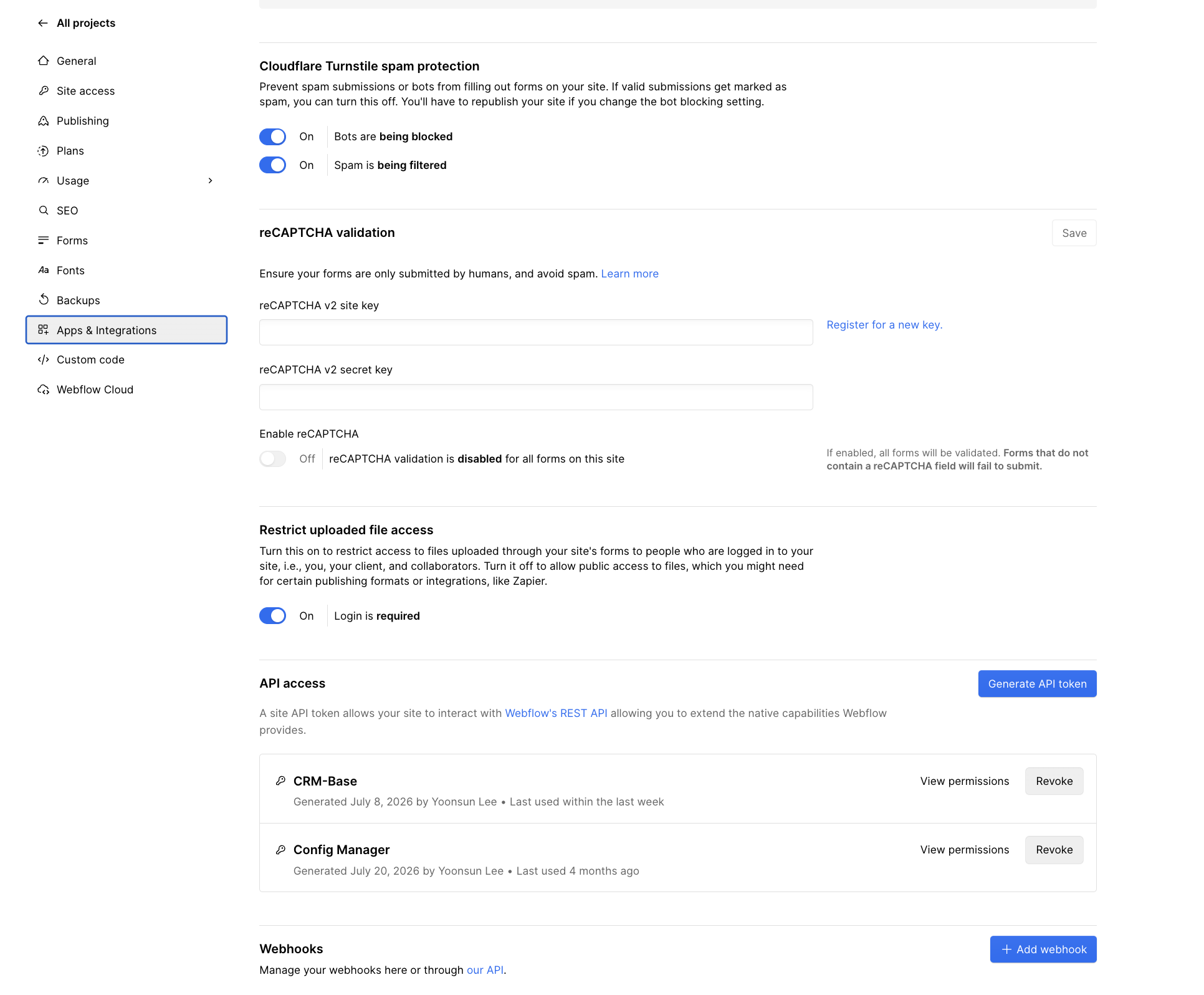
What each setting on this screen does:
| Setting | State | What it means |
|---|---|---|
| Cloudflare Turnstile spam protection: bots | On | Native Webflow forms check a Turnstile token before accepting a submission |
| Turnstile: spam filtering | On | Submissions that pass the bot check are still scored, and spam is kept out of the form inbox. Turn this off if real submissions are being marked as spam |
| reCAPTCHA validation | Off, no keys | Leave off: Turnstile already covers the same forms. Turning it on makes every form without a reCAPTCHA field fail to submit |
| Restrict uploaded file access | On | Files uploaded through forms open only for people logged in to the site (you, a client, collaborators). Turn it off only for an integration that must fetch the file, and know that the files become public |
| API access: CRM-Base | Used within the last week | The site token the CRM Sync Worker uses. Keep it in Worker secrets |
| API access: Config Manager | Last used 4 months ago | An unused token is a key with no owner. Revoke it, or record why it is kept |
| Webhooks | (section below the tokens) | Webhooks added here use the site token and are not signed; see the table above |
Webflow's built-in Turnstile covers native Webflow forms only. A form that posts straight to a Worker (a review form, the newsletter sign-up, a sign-in page served by the Worker) needs its own widget and its own Siteverify check.
Turnstile on a Worker route
- Create a widget in the Cloudflare dashboard under Turnstile → Add widget, listing the hostnames that will show it (for example
crm-sync.dev). The dashboard gives a site key (public, goes in the page) and a secret key (private). - Store the secret as a Worker secret, never in a page or
wrangler.toml:npx wrangler secret put TURNSTILE_SECRET_KEY --config wrangler.toml --env="". - Add the widget to the form:
<script src="https://challenges.cloudflare.com/turnstile/v0/api.js" async defer></script>and<div class="cf-turnstile" data-sitekey="…" data-action="review-submit"></div>. The widget adds acf-turnstile-responsefield to the form. - In the Worker, call Siteverify before any other work and fail closed:
#[derive(serde::Deserialize)]
struct Siteverify { success: bool, hostname: Option<String>, action: Option<String> }

/// Turnstile Siteverify from a Worker (workers-rs). A token is single-use and valid for 300 seconds;
/// check the hostname and action too, so a token minted for another form or site is refused.
async fn turnstile_ok(token: &str, ip: Option<&str>, secret: &str, host: &str, action: &str) -> bool {
    if token.is_empty() || token.len() > 2048 { return false; }
    let mut form = vec![("secret", secret), ("response", token)];
    if let Some(ip) = ip { form.push(("remoteip", ip)); }
    let body = serde_urlencoded::to_string(&form).unwrap_or_default();
    let mut init = worker::RequestInit::new();
    init.with_method(worker::Method::Post).with_body(Some(body.into()));
    let mut headers = worker::Headers::new();
    let _ = headers.set("Content-Type", "application/x-www-form-urlencoded");
    init.with_headers(headers);
    let Ok(req) = worker::Request::new_with_init("https://challenges.cloudflare.com/turnstile/v0/siteverify", &init) else { return false };
    let Ok(mut res) = worker::Fetch::Request(req).send().await else { return false };
    match res.json::<Siteverify>().await {
        Ok(v) => v.success && v.hostname.as_deref() == Some(host) && v.action.as_deref() == Some(action),
        Err(_) => false,
    }
}- Test with Cloudflare's published test keys first (a site key that always passes, one that always fails), then switch to the real keys.
Turnstile setup links: Get started · Client-side rendering · Server-side validation (Siteverify) · Testing keys · Pre-clearance for WAF challenges · Turnstile in the dashboard
WAF rules for the Worker's zone
These are recommended rules, written in Cloudflare's rule language; adjust paths to the Worker's routes. Order matters: exemptions first.
| Rule | Expression | Action |
|---|---|---|
| Machine paths skip challenges | starts_with(http.request.uri.path, "/webhooks/") or starts_with(http.request.uri.path, "/apps/") | Skip: managed challenge and bot rules (signature checks run in the Worker) |
| Admin pages | starts_with(http.request.uri.path, "/admin") | Managed Challenge; the Worker still requires the crm_admin cookie |
| Sign-in and form posts | http.request.method eq "POST" and (starts_with(http.request.uri.path, "/auth/") or http.request.uri.path contains "/reviews") | Rate limit: for example 10 requests per minute per IP, then block for 10 minutes |
| Managed rules | Cloudflare Managed Ruleset (and the OWASP Core Ruleset on paid plans) | Log first for a week, then block |
| Wrong countries for a regime (optional) | ip.src.country in {"…"} and starts_with(http.request.uri.path, "/consent") | Block, only where a residency rule requires it |
Inside the Worker, the Rate Limiting binding ([[ratelimits]] in wrangler.toml) limits by any key the code knows, such as the shop domain or tenant, not just the IP. That is what keeps one tenant from using up another's Shopify or Xano quota, which a per-IP WAF rule can't do.
WAF links: Custom rules · Rate limiting rules · Managed rules · Workers Rate Limiting binding
The Shopify IP allowlist, seen from the Dev Dashboard
The allowlist is the outbound counterpart to the WAF. It limits where the app's Admin API tokens can be used from, not who can reach the app. It is set per app in the Dev Dashboard under Settings → IP allowlist.
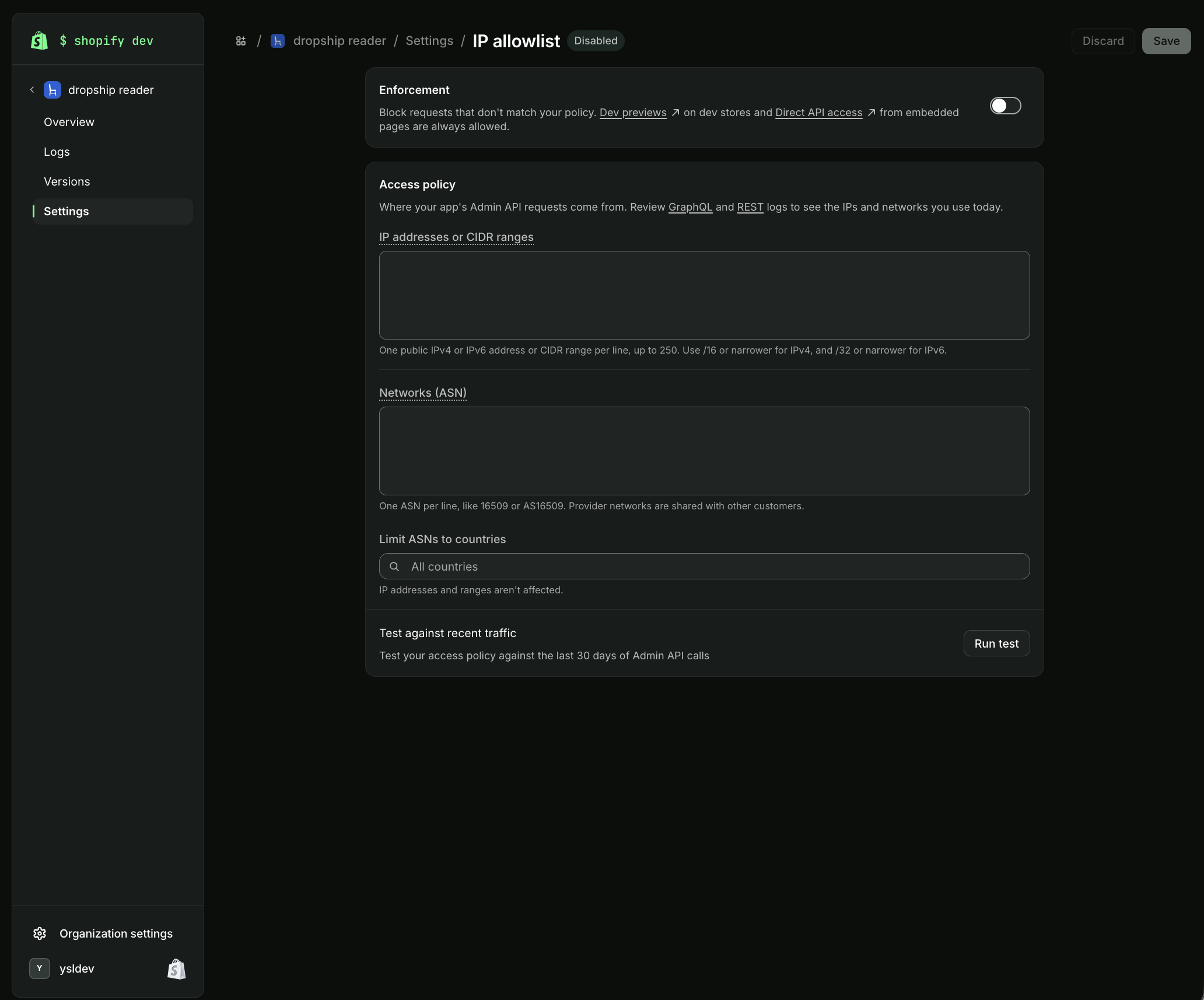
| Feature on this screen | What it does | For an app on Cloudflare Workers |
|---|---|---|
| Enforcement | Off: the policy is only tested. On: Admin API calls from anywhere else get 403 | Turn on only after Run test comes back clean |
| Always allowed | Dev previews on dev stores, and Direct API access from embedded admin pages | The embedded app's own browser calls don't need an entry |
| IP addresses or CIDR ranges | Up to 250 lines; IPv4 /16 or narrower, IPv6 /32 or narrower | Cloudflare's published ranges, split to fit: 47 entries (see Allowlisting an app that runs on Cloudflare) |
| Networks (ASN) | Allow a provider's whole network | Leave Cloudflare's ASN 13335 out: Workers egress has no ASN in Shopify's lookup, so it blocked every request in testing |
| Limit ASNs to countries | Narrows ASN entries to chosen countries; IP ranges aren't affected | Not needed when no ASN is listed |
| Test against recent traffic | Replays the policy against 30 days of Admin API calls and lists what would be blocked | Run before each change; a Xano instance calling Shopify directly shows up here first |
This screen is for the dropship reader app, a custom app, which is exempt from the public-app requirement; it is shown disabled for that reason. UCP, Reviews and PIM Sync, the public apps, have the 47 Cloudflare ranges in place and enforcement on.
Where the code is
| Check | Code |
|---|---|
| Shopify webhook HMAC | workers/crm-sync/src/index.ts, verifyShopifyHmac |
| Webflow webhook signature | workers/crm-sync/src/index.ts, verifyWebflowSignature |
| Shopify session token (Thank you page) | workers/crm-sync/src/index.ts, handleCheckoutAdsConsent |
| Constant-time compare | workers/crm-sync/src/index.ts, timingSafeEqualHex |
| Design Auth extension (bearer token today) | extensions/design-auth/src/index.ts |
| Xano ads export, release gate, consent ledger | Workspace 4: functions 115, 122, 123, 126; tables 183, 191, 192; API groups 69, 76 |
Checklist
- Every secret generated, not typed; stored in Worker secrets or Xano env; recorded by fingerprint.
- Shopify: webhook HMAC, session token
dest/aud, OAuthhmacand app proxysignatureall checked in constant time; two secrets held during a rotation. - Webflow: webhooks from the OAuth app (signed), not site-token webhooks; Designer Extension moved to
getIdToken()+/v2/token/resolve; unused site tokens revoked. - Turnstile on every public form: Webflow's switch for native forms, a widget plus Siteverify for Worker forms.
- WAF: machine paths exempt from challenges; admin challenged; sign-in and form posts rate limited.
- Shopify IP allowlist: Run test clean, then enforcement on, for every public app.
- Key-less tools (Matrixify, Airtable, ERP exports): file landed in R2, hashed and signed under your
kid, checked at the gate, handed over by a short-lived signed URL.