CRM SYNC
Human and Machine Data Management
CRM reshape for Agentic APIs
Trust and judgement frameworks for paired human and machine data networks
Traditional CRM Pivot
From human-to-human workflows to protocol-first commerce infrastructure
Existing CRMs assume every interaction has a human on both sides — Agentic process: UCP, A2A, and AP2 break that assumption.
The CRM must evolve from a record-keeping system into an active infrastructure layer that serves both human sessions and machine-to-machine agent requests.
Agentic Commerce
AI agents discover, negotiate, and transact on behalf of customers — without a browser
In agent-mediated commerce, an AI agent discovers a merchant’s capabilities via protocol endpoints, negotiates on behalf of a customer, and authorizes payments — all without a browser session or human in the loop.
The CRM becomes the system of record that agents query to understand what a customer wants, what they have agreed to, and what actions are available.
Security and Boundary Design
Every agent interaction is gated, scoped, and cryptographically verifiable
Agent access requires explicit boundaries that traditional CRMs never needed. Mandate tokens with HMAC signatures, JWT-scoped sessions, and per-action authorization ensure that no agent can exceed the permissions a customer has granted. The trust boundary between the customer, the merchant, and the agent is enforced at every API call — not assumed.
Permissions
Granular entitlements that distinguish human access from agent access
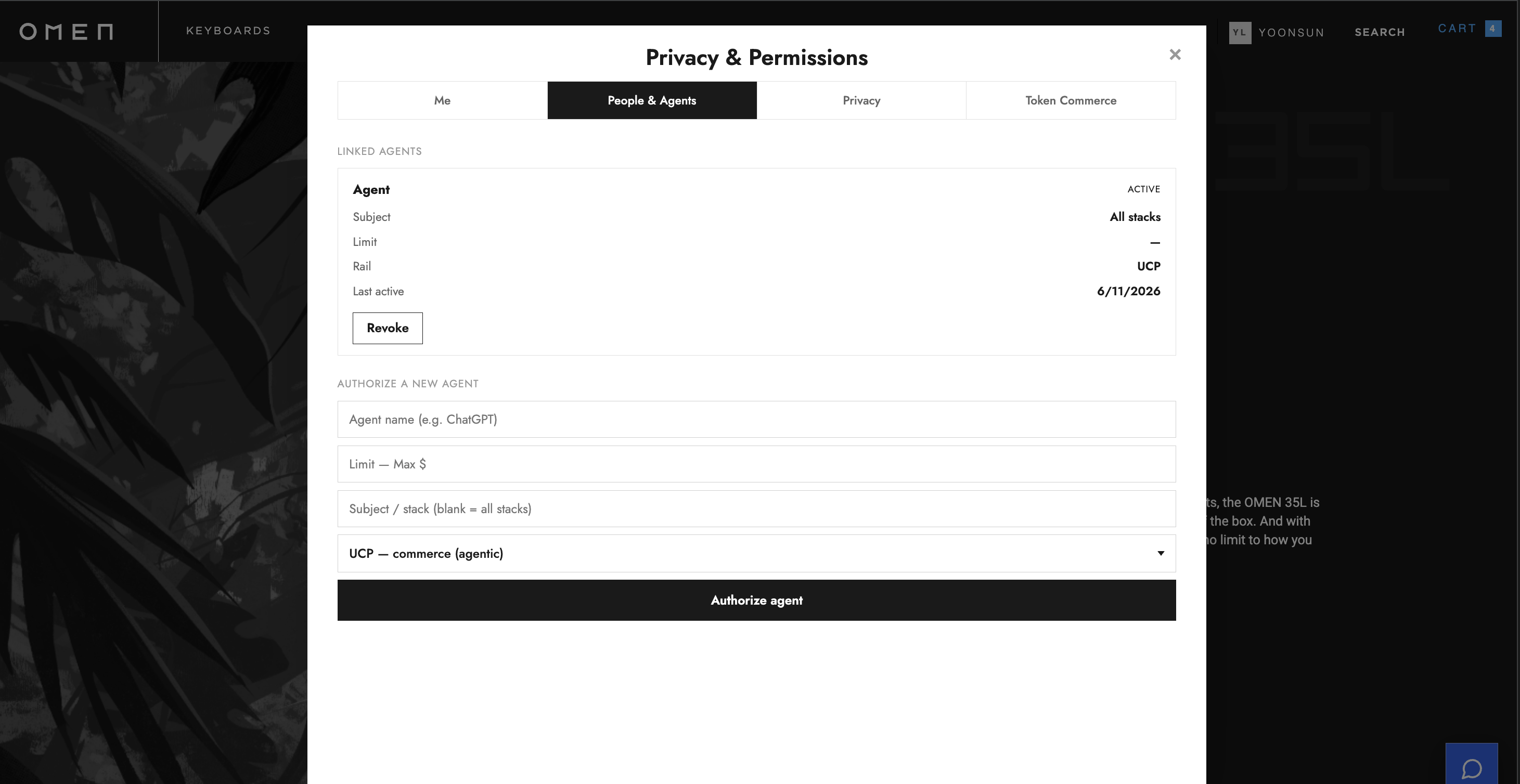
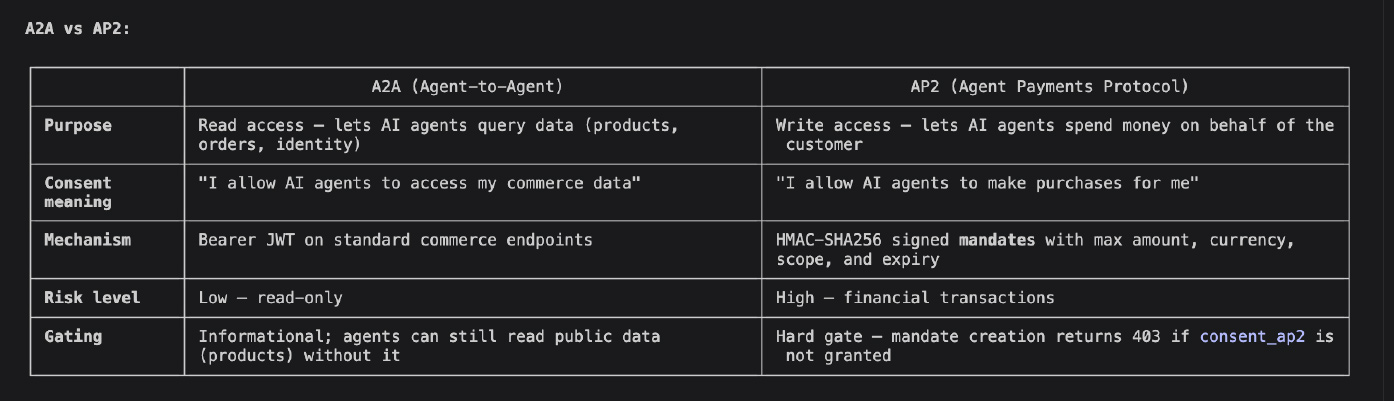
A customer may allow a human marketer to send email campaigns but not authorize an AI agent to make purchases on their behalf. The CRM must manage two distinct permission layers — A2A (what agents can see and do) and AP2 (what agents can spend) — each independently granted, scoped, and revocable. No existing CRM separates these concerns.
Consent
Auditable, revocable, real-time consent as the single source of truth
Consent is not a one-time banner click. Every preference — Terms of Service, Privacy, Cookie Analytics, Marketing, A2A agent access, AP2 agent payments — is an individual, timestamped, method-tracked record with full provenance. The customer can review, modify, or revoke any consent at any time, and every change propagates immediately to all downstream services: GA4 consent mode, Shopify tags, email platforms, and agent entitlements.
Real Time
Every state change propagates instantly across all channels and agents
When a customer revokes marketing consent, the CRM does not wait for a nightly sync. The consent banner updates, GA4 stops collecting analytics, the Shopify customer tags change, email campaigns exclude the customer, and any AI agent querying the entitlement API gets the new state — all within the same request cycle. The CRM is the live, authoritative source of truth, not a cache of stale records.
architecture
Boundary Logic and Gating Events. Trust Infrastructure Frameworks. Risk Management for AI Incident Remediation System Framework.

capabilities
1
Session Registration/updates cross channel/mobile, game, IoT, household, location, currency, language
2
Permissions restrictions
3
Token Creation, with timestamp, currency language automation
4
Consent status update, in real time
5
Agnostic Framework, CMS, Scaling. Supports Mobile, Browser, Game, IoT, App, Point of Sale
benefits
1
Distributed collaboration comments, iterations and content strategy
2
Bespoke application build with non destructive publishing
3
Scaling with localization, cross channel agnostic-all platform support
4
Designer/Business Team Objective input
5
Stage, Prod, Dev Version Management
6
Non Destructive Deploy, with scheduling and fallback
7
Protected Data
8
Encryption and Transport workflows
9
Versioning
10
Key Management
11
Login and Form Tracking linked to Organic Segmentation
- Home
- Work
- About
- Contact
Application
Shopify Native Application
Shopify Application Data Connection with Security Services
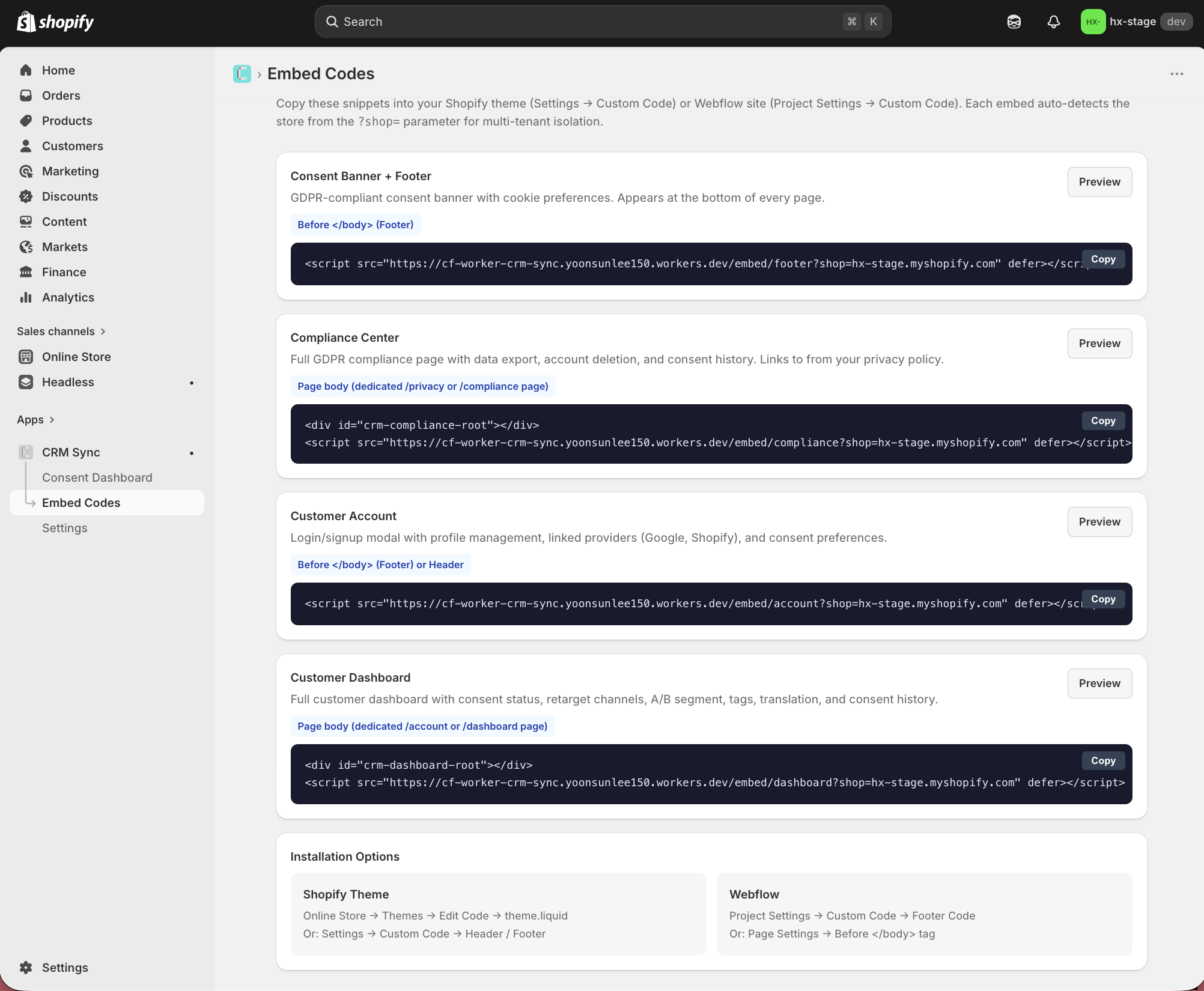
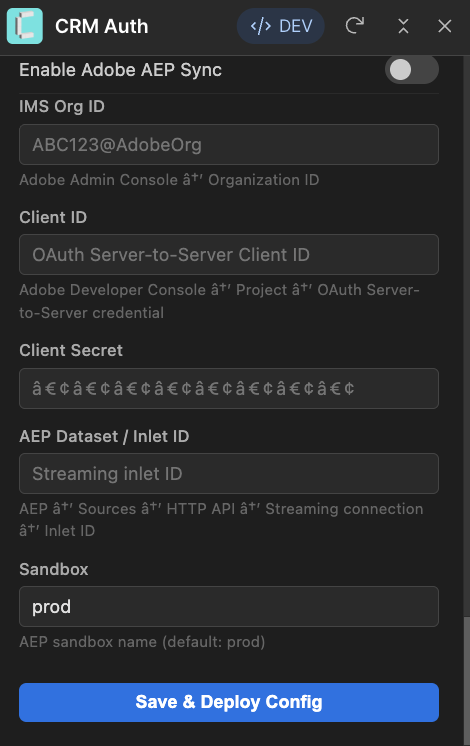
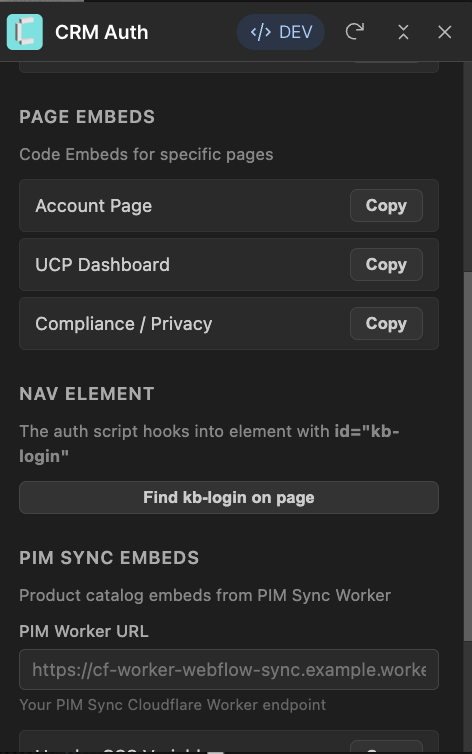
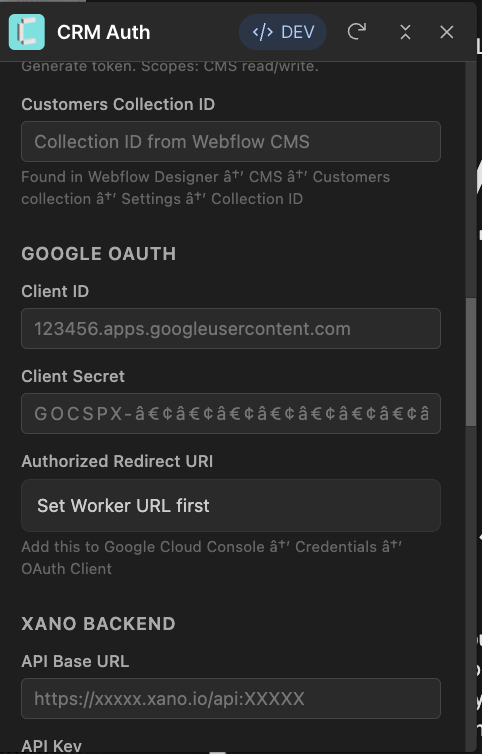
Configuration Management
Component based configuration app. Webflow/React/Typescript, Xano Data Orchestartion, Cloudflare Server
Short Lived Key rotation dashboard. Configuration management with group/team access and permissions managers.
https://crm.story-story.ai/extension/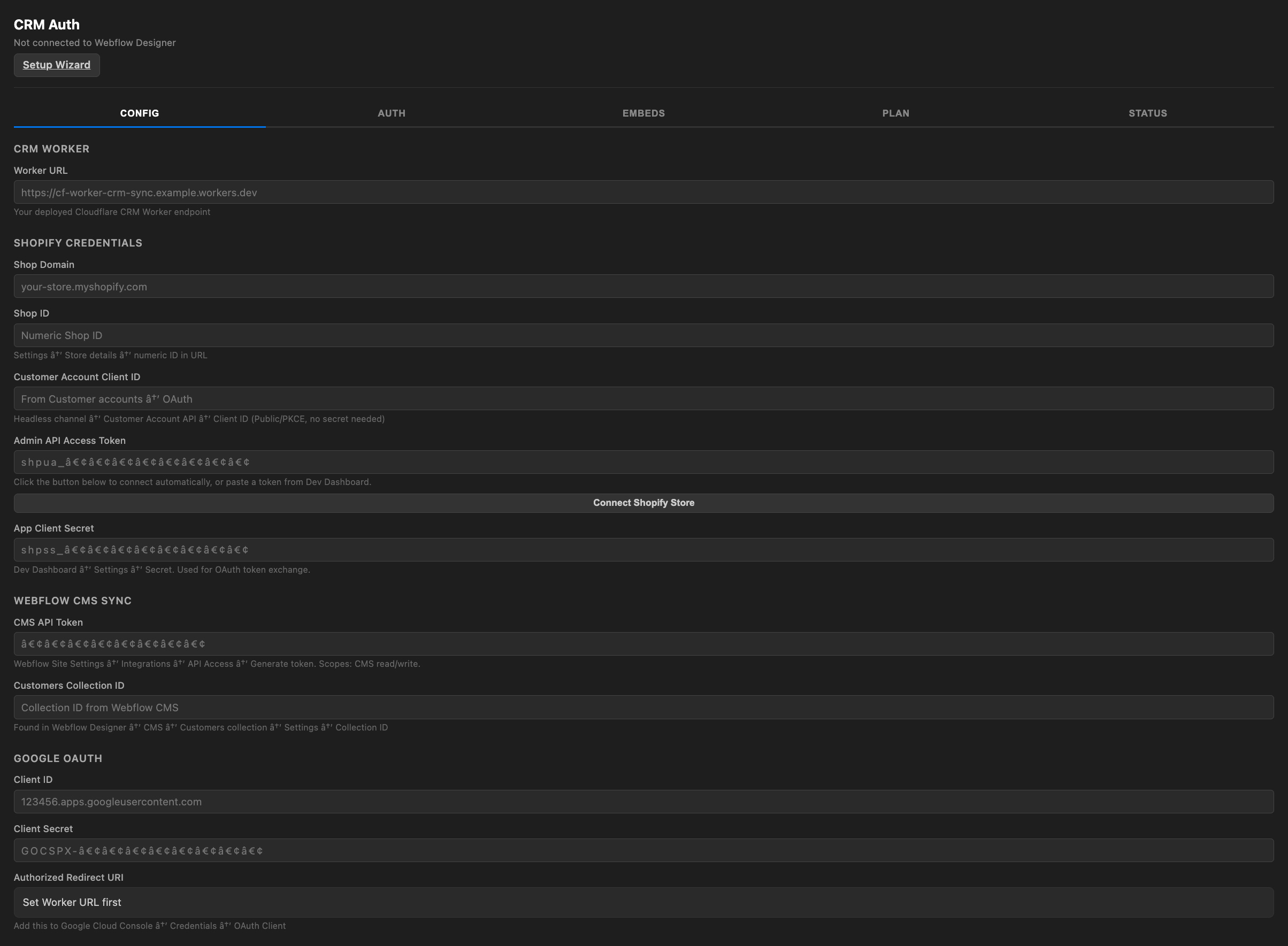

Challenge
.env key from build dependency is bound to Build Step
APIs keys visible to AI Agents are subject to security breach
Multi tenant data feeds cannot be tested with staging data and entitlement
Adobe, Salesforce, Braze, Attentive, Klaviyo authorization keys are not linked to Shopify User Data/state/consent
Form Success / Error / Validation and Accepts Terms is not synced to User API
APIs:
Google Signals and Consent
Google Auth
Youtube/Social
Google Merchant
GA4 Event Funnel
Entitlement is only applied to 'Client' Browser Channels. Mobile, App, Game, Point of Sales data/consent never registers.
Multiple APIs and Plugins that are on time lag.
Reviews, Customer Service, Forms are not logged to omni channel development events from server.
Solution
Create Configuration Wizard that can be set with Cloudflare Secure API keys that are not visible to content editors, fulfillment teams, customer service teams, consulting teams.
Create Configuration Keys that work with deterministic data layer that can be managed in stage, prod, dev SOC2 compliant test harness
Roll key managers from 2 locations: Cloudflare and Xano
Webflow React Design Extension Reference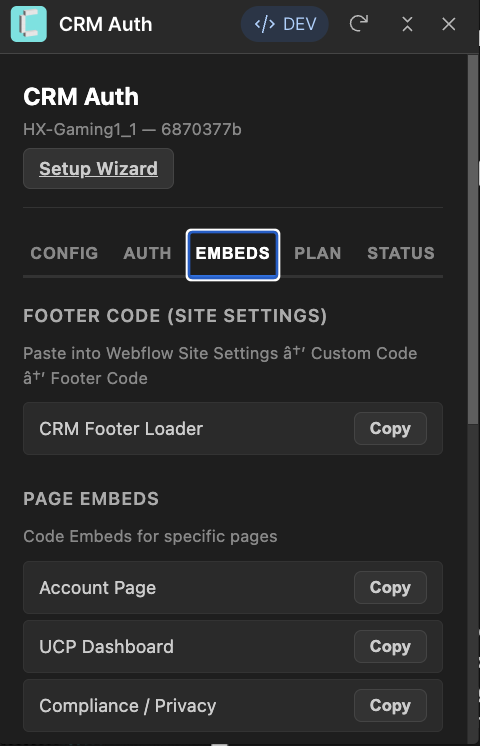
agentic payments
Registered Mandate Records, History and Permissions
security reinforcement
Server Side Security Events
PKCE — Proof Key for Code Exchange
A security add-on for login flows that prevents someone from stealing your login code mid-transit. The system creates a fresh secret for every login attempt. Only the matching puzzle (not the secret itself) is sent to the login provider. If an attacker intercepts the login code, they can’t use it because they don’t have the secret.
TLS — Transport Layer Security
The encryption that protects data as it moves between your browser and the server. It’s the ‘S’ in HTTPS. Everything in transit — passwords, tokens, customer data — is scrambled so that anyone intercepting the traffic sees only random noise. The lock icon in your browser means TLS is active.
OIDC — OpenID Connect
A standard that lets users sign in using an account they already have (like Google or Shopify) without sharing their password with you. The provider verifies who they are and sends back a signed ID card. Your system trusts the ID card because it’s signed by the provider. The user’s external password never touches your system.
JWT — JSON Web Token (Session Pass)
A tamper-proof digital wristband for your session. After you log in, the server issues a small signed packet holding your identity (user ID, email, name) and stores it in your browser as a secure cookie. Every time you visit a protected page, your browser sends it back automatically — the server checks the signature hasn't been altered and the pass hasn't expired, so you stay logged in without re-entering your password. Change a single character and the signature breaks, so it can't be forged.
HMAC — Hash-Based Message Authentication Code
A way to verify that a message (like an update from Shopify) actually came from Shopify and wasn’t altered in transit. Both sides share a secret key. When Shopify sends an update, it creates a fingerprint of the message using the shared key. The server creates its own fingerprint and compares — if they match, the message is authentic.
Zero Trust — Never Trust, Always Verify
A security philosophy that says every request must prove it’s authorized — even from inside the network. Traditional security is like a building with one locked front door: once inside, you can go anywhere. Zero Trust is like a building where every room has its own lock and every person must badge in at every door, every time.
Testing
Challenge
Most e-commerce apps test manually — someone clicks through the site and checks if things look right
No way to verify that all 67 endpoints return the correct status codes after a deploy
Multi-tenant isolation is impossible to test by hand — you can’t easily confirm that Store A’s data never leaks into Store B
CORS, auth gates, and consent enforcement are invisible in the browser — broken security often ships undetected
Traditional CRMs provide no testing tools at all — Salesforce and HubSpot expect you to trust their platform without verification
Solution
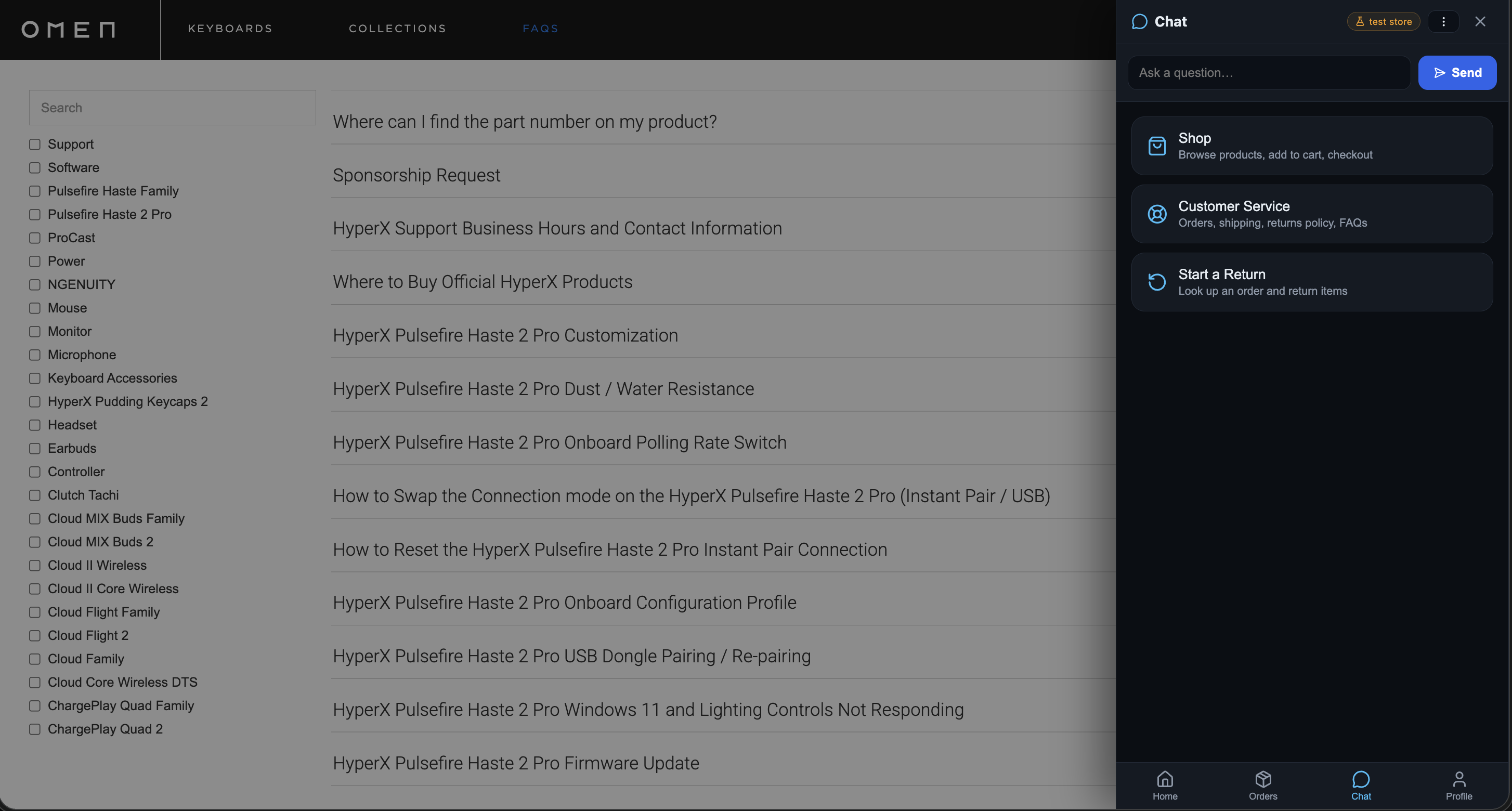
Built-in Status Tab — the Webflow extension includes a live health dashboard that checks every endpoint, verifies redirect URIs, tests privacy APIs, and validates GDPR handlers in one click
Automated Smoke Tests — a single command (npm run test:smoke) validates all endpoints against the functional spec, checking status codes, CORS headers, auth gates, and response formats
Multi-Tenant Isolation Tests — a dedicated test suite (npm run test:tenant) provisions two test stores and verifies that config, embed data, and sync state are fully isolated between tenants
Mapped to Spec — every test maps directly to a UAT test case in the Functional Spec (Section 7.2, PRE-01 through PRE-08), creating a clear audit trail from requirement to verification
Functional Spec - Test Harness - Regression ReleaseLegacy Shopify CSV to AI/API Mirgration GuideRun Before Every Deploy — tests execute in seconds from the command line, so broken endpoints are caught before they reach production, not after a customer reports an issue
No Manual QA Required — security boundaries (auth, CORS, HMAC, consent gates) are verified programmatically, not by a human clicking through the UI and hoping they didn’t miss anything
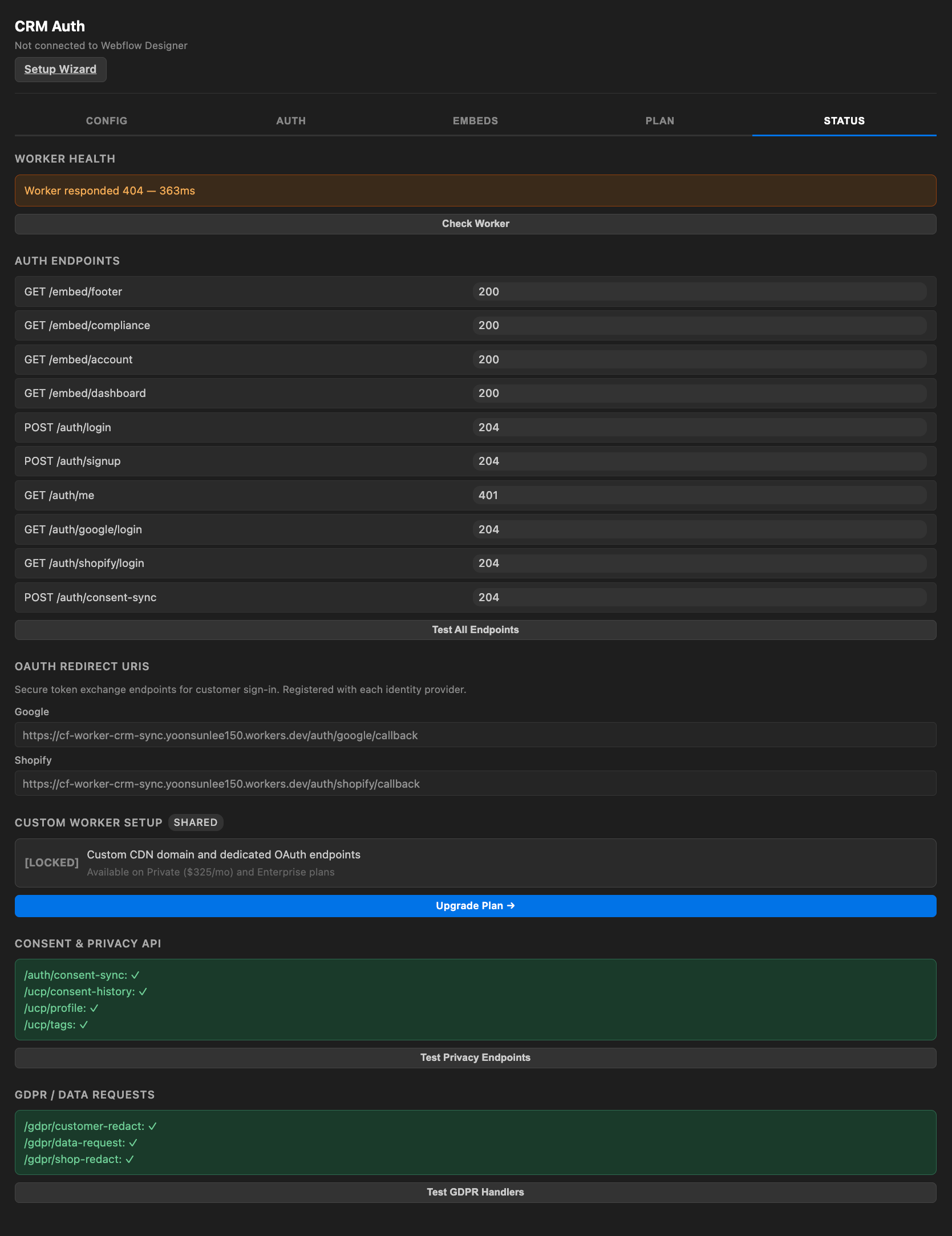
fuzzy search
Language Automation for AEO Optimized Content
Fuzzy search optimized for AEO is a retrieval technique designed to surface content for AI answer engines (ChatGPT, Claude, Perplexity, Google AI Overviews, Gemini) when queries arrive as natural-language questions rather than keyword strings — and to tolerate the linguistic variation that comes with how people and LLMs phrase things.
Fuzzy search optimized for AEO (Answer Engine Optimization) is a way of matching content to questions that AI engines like ChatGPT, Claude, or Google AI Overviews ask on behalf of users. Instead of just correcting typos or matching keywords like traditional fuzzy search, it uses meaning-based matching (embeddings and semantic similarity) so a query like "affordable wireless gaming headset" can still find your page even if you wrote "budget Bluetooth headphones under $100." It also indexes content in small, answerable chunks, normalizes entities like brand and product names, and relies on structured data so AI engines can confidently pull and cite your content as the answer.
AEO Search
Fuzzy Match AEO and NLP / LLM optimized.
Challenge
Standard Shopify search ranks products by title match alone — it doesn’t know who the customer is
Every visitor sees the same results in the same order, regardless of purchase history, loyalty tier, or browsing behavior
A VIP customer searching “microphone” sees the same generic list as a first-time visitor
No opportunity to surface relevant bundles or upsells based on what they already own
Search results are disconnected from CRM data, consent status and campaign targeting
Solution
CRM Sync connects search to the customer’s real-time profile — tags, order history, segment, and consent status
Results can be weighted by segment — surfacing bundles that complement past purchases
In-stock items prioritized for the customer’s region based on tenant group (US/CA/DE/FR/UK)
Campaign-tagged products promoted to matching tiers (VIP sees VIP offers, prospects see entry-level)
All personalization respects the consent gate — if a customer hasn’t opted in, they get default results
Every search interaction feeds back into GA4 as a server-side event with CRM context
Analytics show not just what people searched for, but which customer segments searched for it
Smarter merchandising decisions without relying on client-side tracking and ad blockers
A B targeting with Social Tag is Fine Grained, with Session Consent Google Signal Record privately linked to Segment/Customer ID with Marketing Consent History
Tags / Category Dynamically Load to Filters cross channel
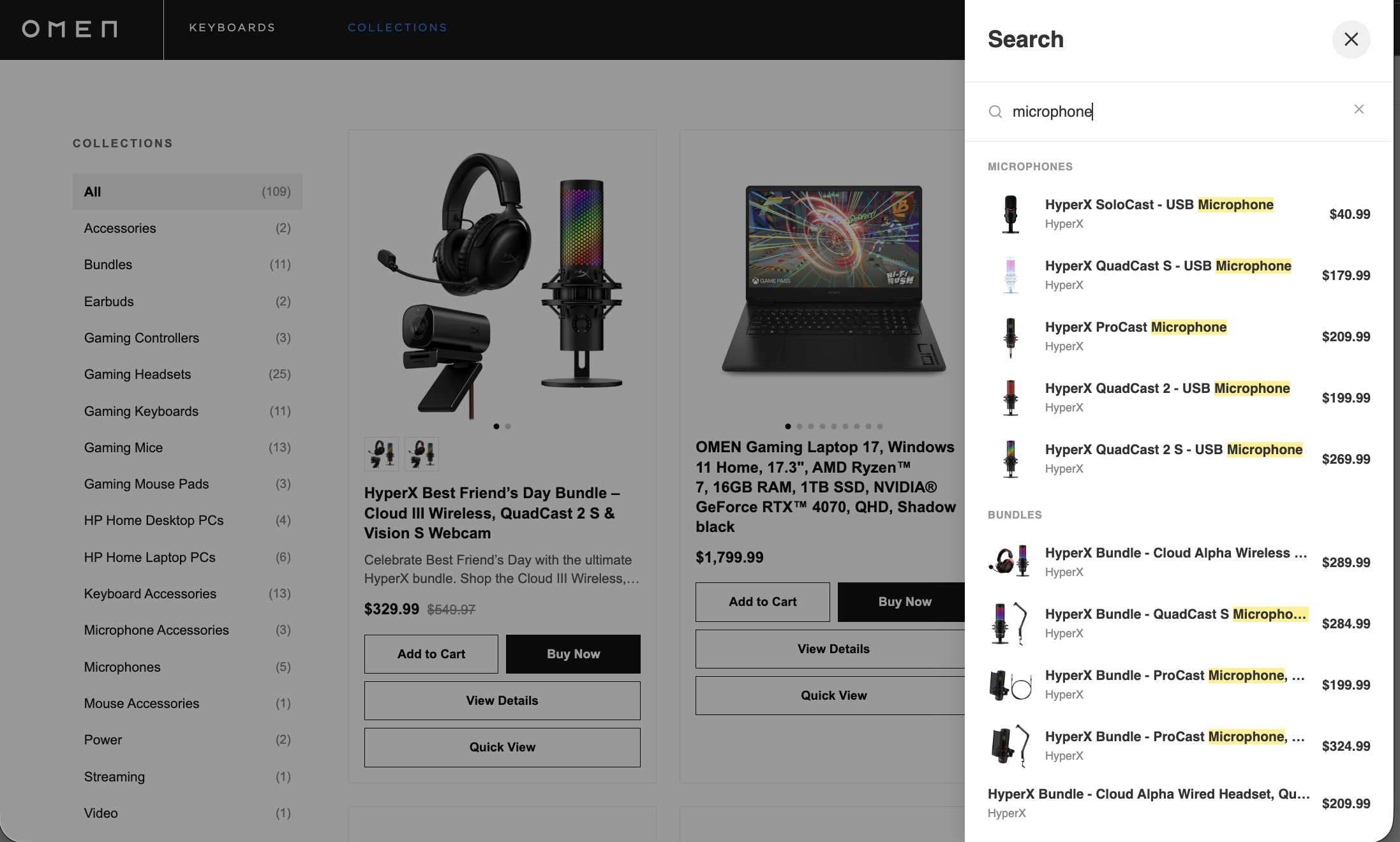
Related Products
Challenge
Shopify’s default “related products” are based on collections and product type — not customer behavior or CRM data
A customer viewing a microphone sees generic recommendations like other microphones, not complementary gear they’d actually pair with it
No awareness of what the customer already owns — a returning buyer who has the headset still gets recommended the same headset
Recommendations don’t reflect loyalty tier, campaign enrollment, or purchase intent signals from the CRM
Static pairings require manual merchandising effort — someone on your team has to curate “pairs well with” for every SKU
Solution
CRM Sync feeds customer tags, order history, and segment data into the product page context in real time
“Pairs with” suggestions become dynamic — a customer who owns the HyperX headset sees the boom arm and pop filter, not another headset
Bundles and accessories prioritized by what’s missing from their setup based on Shopify order data synced to the CRM
VIP and high-value segments see premium pairings and exclusive bundles; new customers see starter kits and entry-level combos
Campaign-tagged products injected into recommendations — a summer promotion mic stand appears for customers in the target segment
Consent-gated personalization — customers who haven’t opted in see the default curated pairings, no profiling applied
Every “pairs with” click and add-to-cart tracked as a server-side GA4 event with CRM context (segment, tier, campaign source)
Merchandising team gets analytics on which pairings convert by customer segment, not just overall click rate
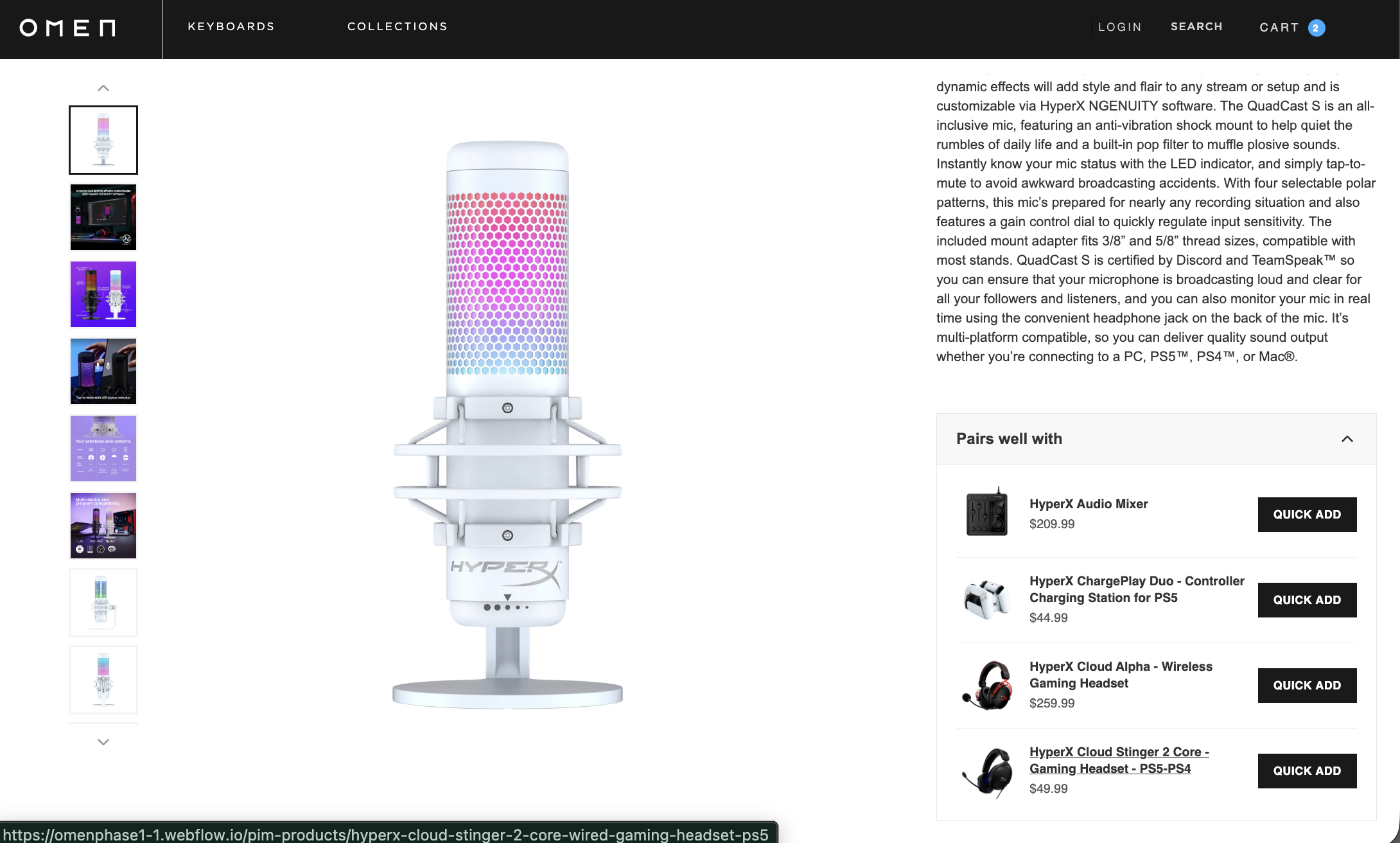
chatbot
Challenge
Tool calls rely on brittle flow/sub-workflow binding — inputs don't pass, outputs can't be read; search and actions fail intermittently.
Only transient chat state — no durable identity, consent, or permissions across sessions/channels.
To transact it orchestrates raw Shopify API calls with no enforcement — overselling, exposed tokens, invalid carts.
Can talk about products but can't safely buy on the shopper's behalf — no consented, bounded authorization.
Catalog/price/FAQ copied or vectorized into the bot and drifts from what's live.
Logic trapped inside Botpress flows — reuse elsewhere means rebuilding.
No provable record of who authorized what; flow-only logic is hard to test.
Solution
Typed MCP tools return structured JSON; the LLM fills params and gets data back — deterministic, testable.
Xano is the identity source of truth; a verified crm_jwt gates every customer tool (fails closed); secrets stay server-side.
The Brain owns cart/checkout/orders/returns/out-of-stock/compare-at — rules enforced server-side; no overselling or token leaks.
AP2 mandates (signed, capped $2,500/24h, scoped, consent-gated) let the agent buy within limits; over-cap is rejected.
One Brain serves every surface from live sources; change a rule once, all clients get it.
Channel- and model-agnostic — any MCP client reuses the same /mcp, no rewrite.
Mandates, agent_orders, consent records, GA4 events give a provable trail; verified by the resolution-map suite + CI.
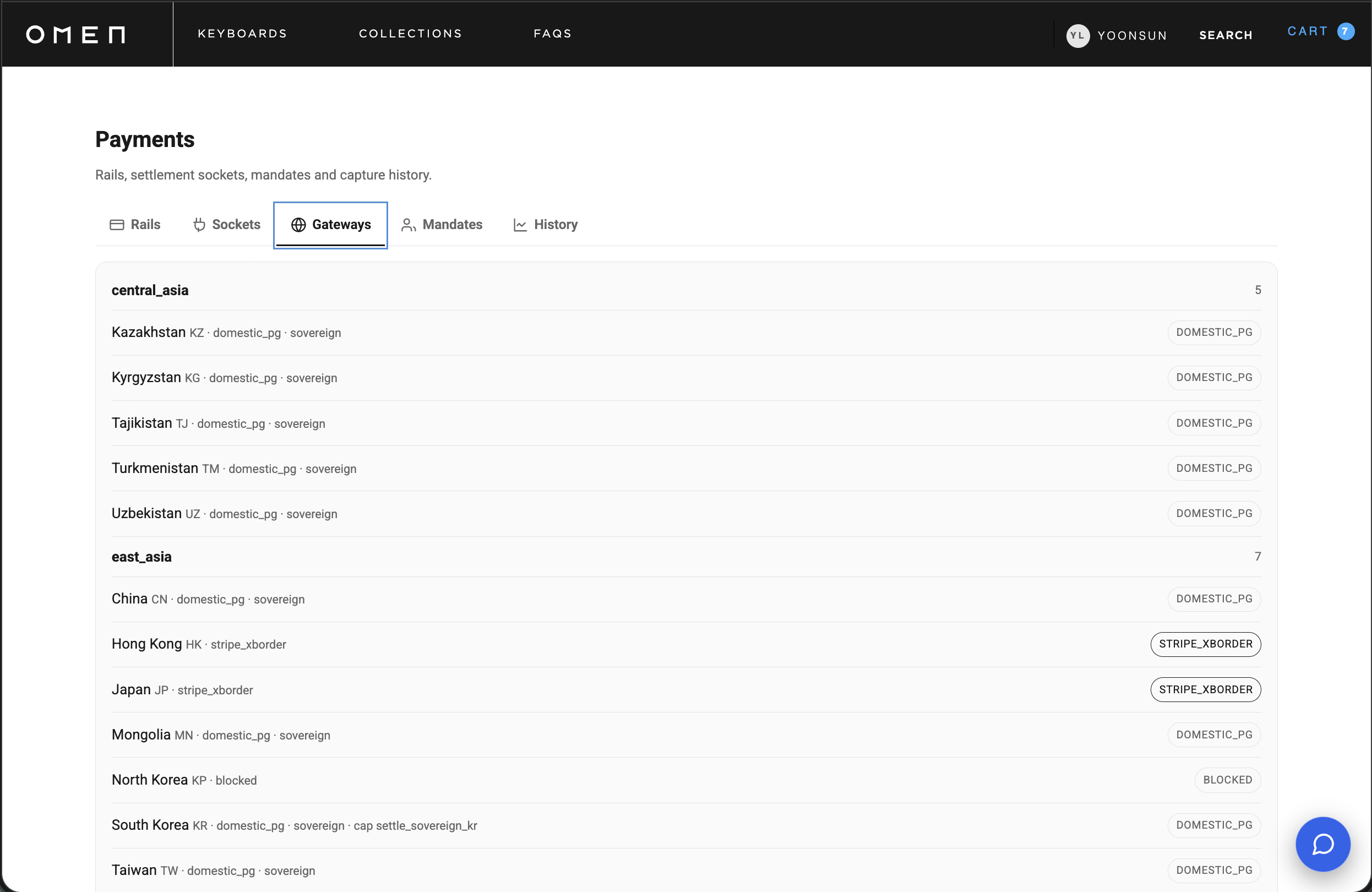
Dashboard
Challenge
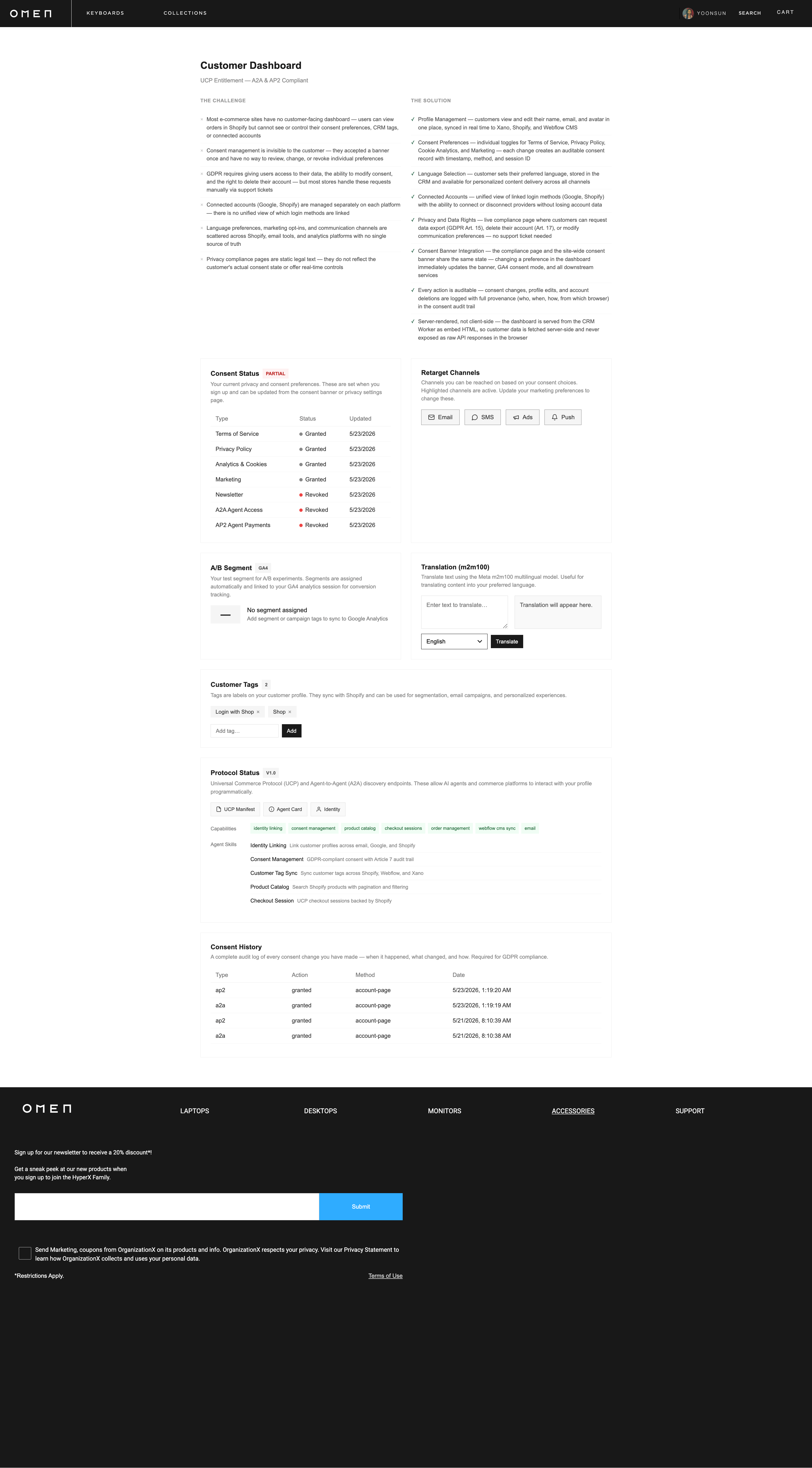
Most e-commerce sites have no customer-facing dashboard — users can view orders in Shopify, but can’t see or control their consent preferences, CRM tags, or connected accounts
Consent management is invisible to the customer — they accepted a banner once and have no way to review, change, or revoke individual preferences
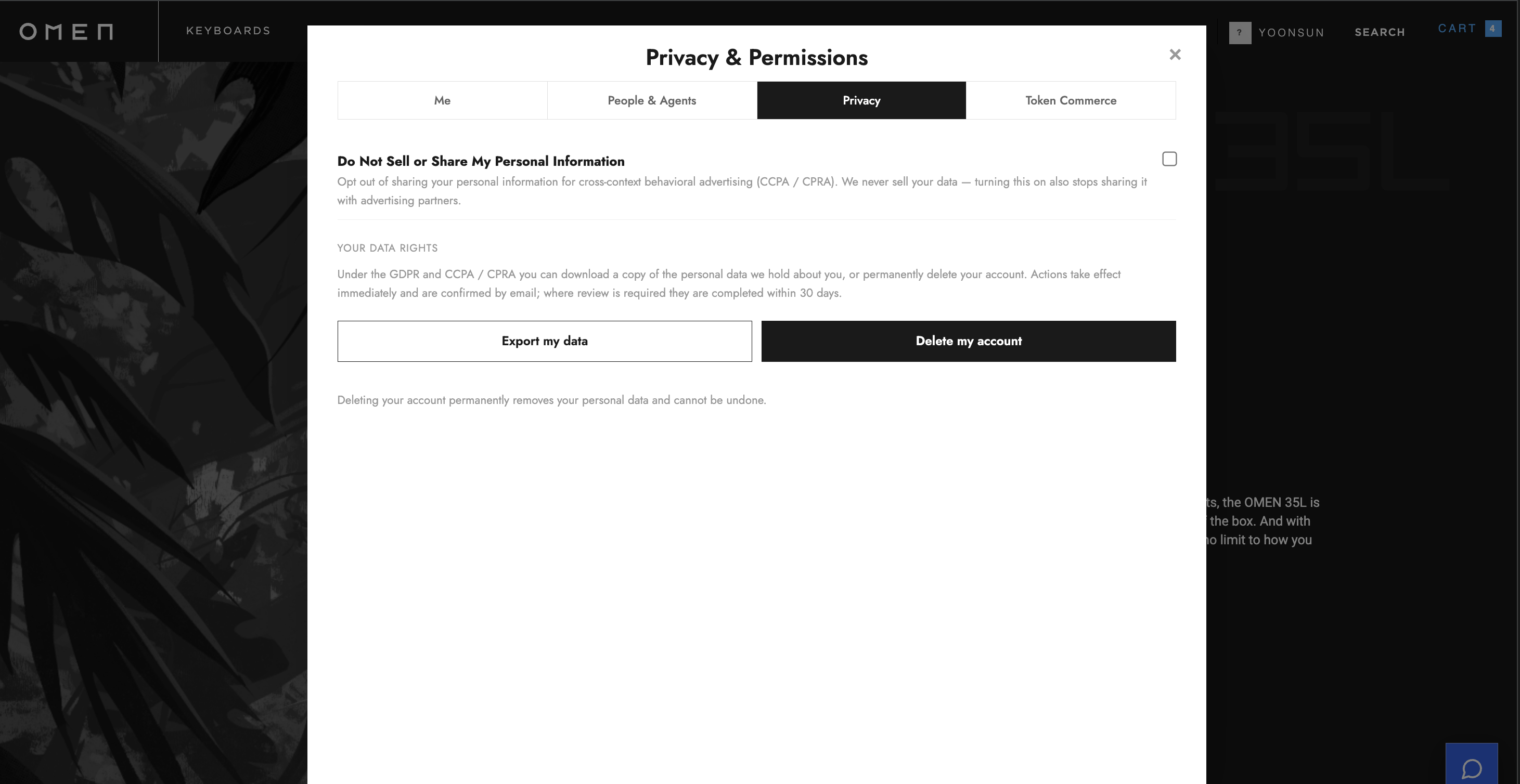
GDPR requires giving users access to their data, the ability to modify consent, and the right to delete their account — but most stores handle these requests manually via support tickets
Connected accounts (Google, Shopify) are managed separately on each platform — there’s no unified view of which login methods are linked
Language preferences, marketing opt-ins, and communication channels are scattered across Shopify, email tools, and analytics platforms with no single source of truth
Privacy compliance pages are static legal text — they don’t reflect the customer’s actual consent state or offer real-time controls
Solution
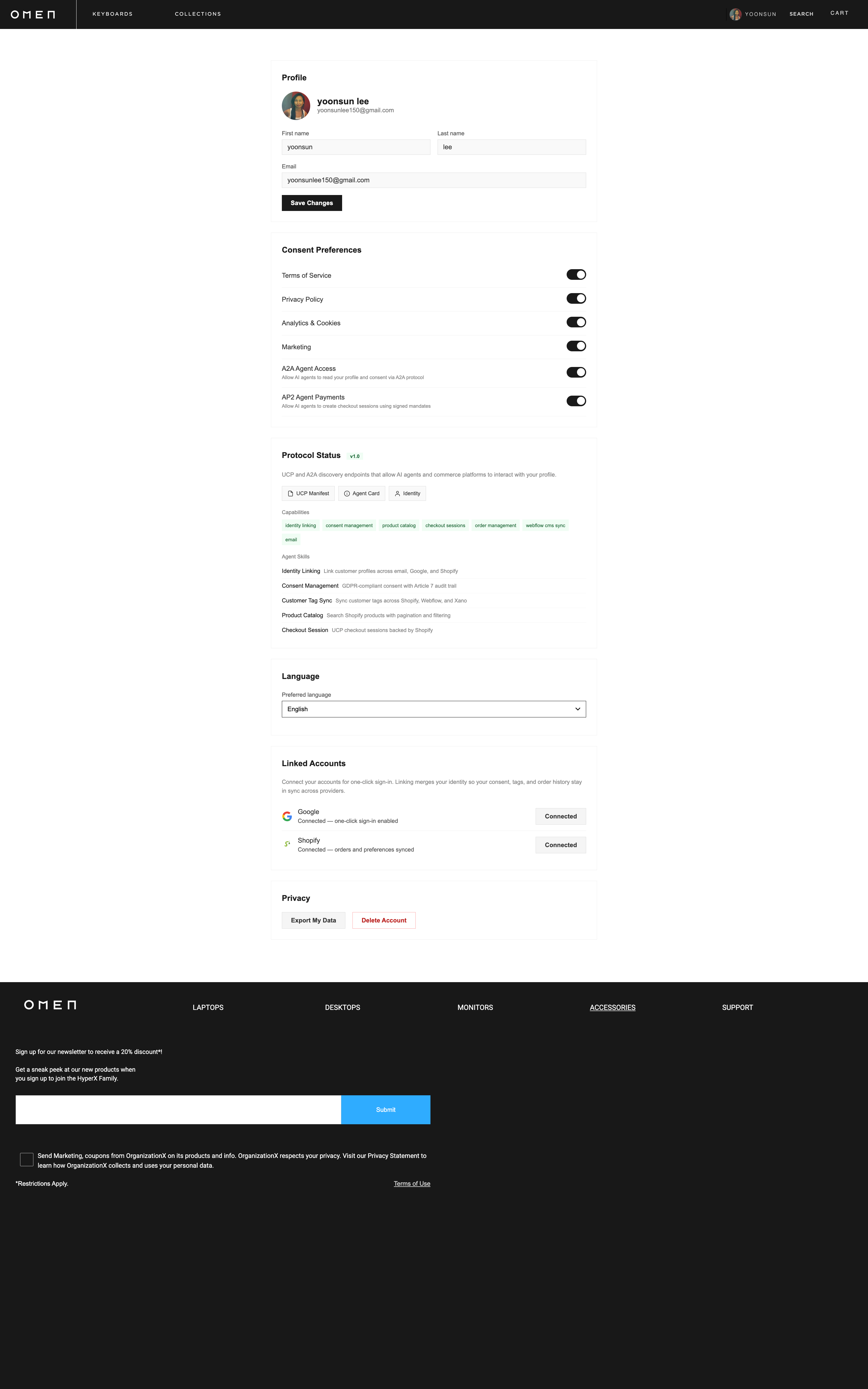
Profile Management — customers view and edit their name, email, and avatar in one place, synced in real time to Xano, Shopify, and Webflow CMS
Consent Preferences — individual toggles for Terms of Service, Privacy Policy, Cookie Analytics, and Marketing — each change creates an auditable consent record with timestamp, method, and session ID
Language Selection — customer sets their preferred language, stored in the CRM and available for personalized content delivery across all channels
Connected Accounts — unified view of linked login methods (Google, Shopify) with the ability to connect or disconnect providers without losing account data
Privacy & Data Rights — live compliance page where customers can request data export (GDPR Art. 15), delete their account (Art. 17), or modify communication preferences — no support ticket needed
Consent Banner Integration — the compliance page and the site-wide consent banner share the same state — changing a preference in the dashboard immediately updates the banner, GA4 consent mode, and all downstream services
Every action is auditable — consent changes, profile edits, and account deletions are logged with full provenance (who, when, how, from which browser) in the consent audit trail
Server-rendered, not client-side — the dashboard is served from the CRM Worker as embed HTML, so customer data is fetched server-side and never exposed as raw API responses in the browser
Entitlement
Challenge
Three separate login systems (email, Google, Shopify) with no shared session — users create duplicate accounts without realizing it
Consent status is never stored persistently — a user accepts the cookie banner and it resets on the nex visit or device
Shopify apps require short-lived API keys with automatic refresh, but most implementations store static tokens that expire silently and break the integration
Registration, forgot password, and SSO callback paths are fragmented across different services with no unified error handling or redirect flow
BAU and upstream ERPs, CRMs: Adobe/Salesforce/Klaviyo are not linked
Solution
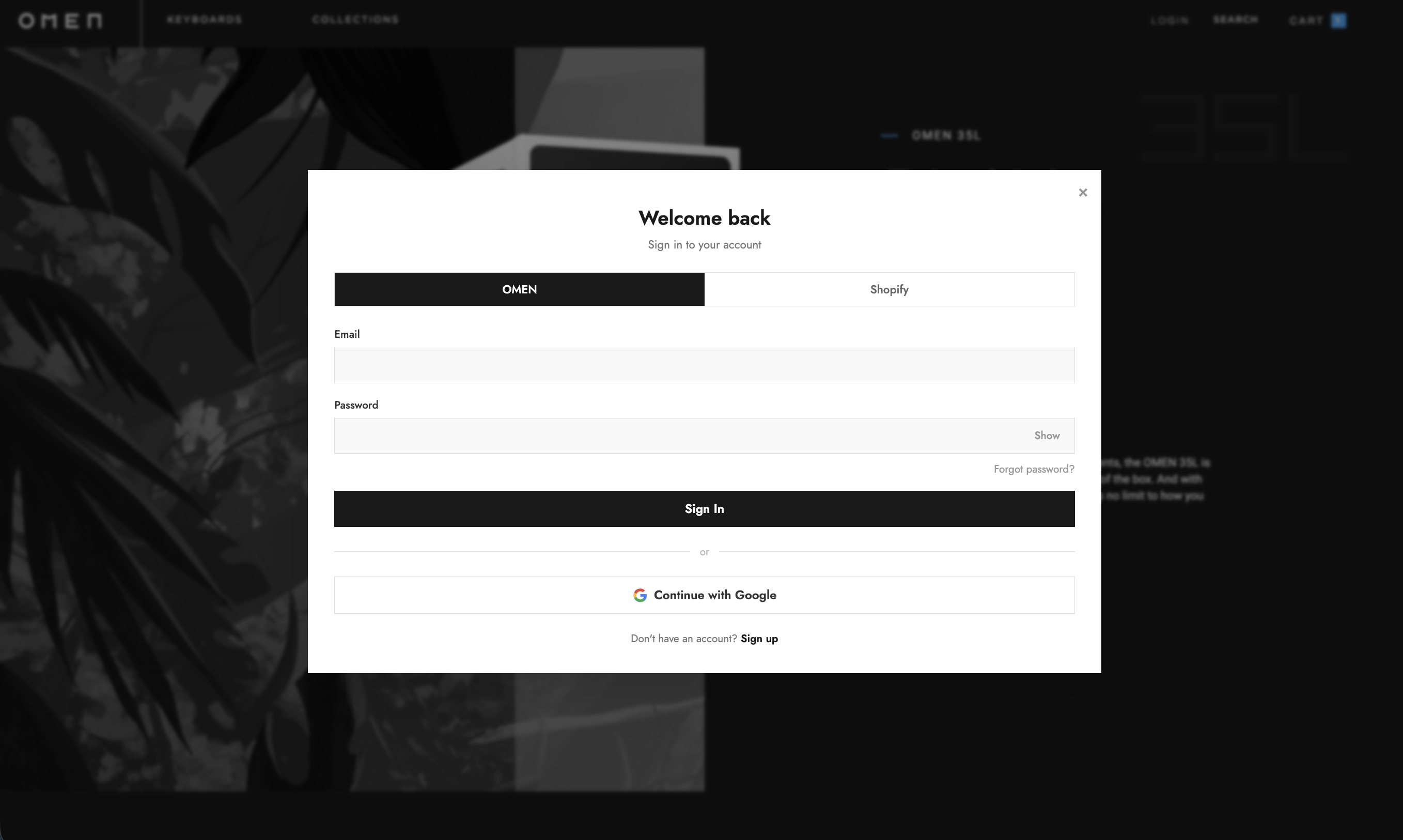
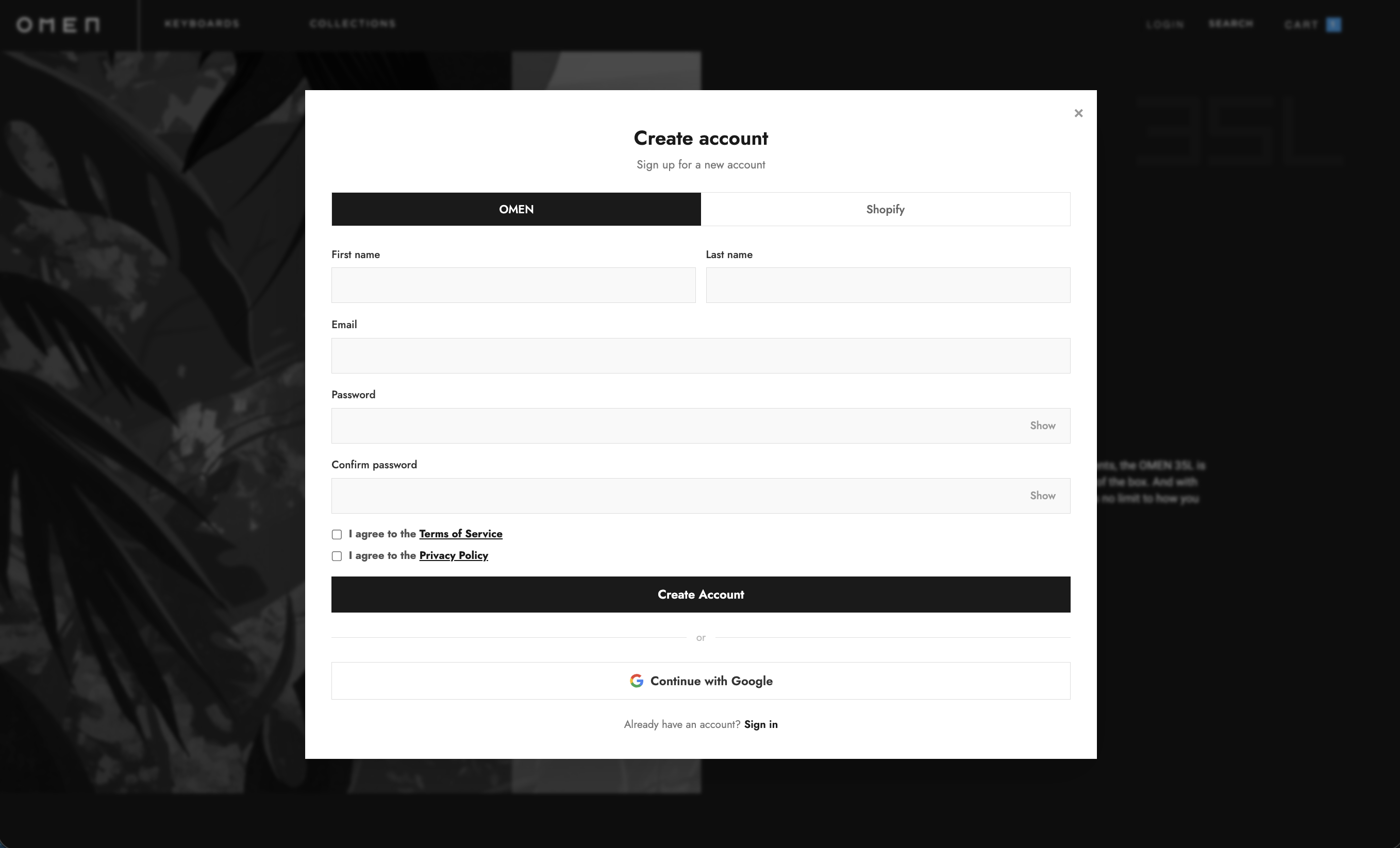
Unified identity resolution — email, Google, and Shopify login all converge at the same user record. If a customer signs up with email and later clicks “Sign in with Google” using the same email, the accounts are linked automatically — no duplicate
Persistent consent with audit trail — consent preferences (TOS, privacy, cookie, marketing) are stored in the database with every change logged: timestamp, method, browser, session ID. Preferences survive across sessions, devices, and browsers
Auth settings in one panel — toggle email/password, Google OAuth, and Shopify Customer Account login on or off from the extension Auth tab. Enable or disable individual methods without code changes
Consent and privacy toggles — cookie consent banner, TOS on signup, compliance page, and marketing opt-in are each independently configurable. Turn the consent banner off for internal sites, require TOS on signup for public-facing stores
Session management — configurable token expiry (default 7 days) and idle timeout with server-validated logout. Session tokens are http Only cookies that JavaScript cannot access
Password recovery and welcome flow — forgot password sends a time-limited reset link (1 hour). New Shopify-origin customers automatically receive a welcome email (24 hour link) to set their websitepassword
Automatic token refresh — Shopify Admin API tokens (shpua_) expire in 60 minutes. The worker automatically refreshes them before expiry using the stored refresh token — no manual rotation, no silent failures
Real-time sync on every auth event — login, registration, password reset, and SSO callback all trigger immediate updates to Xano, Shopify tags, Webflow CMS, GA4 user properties, and Adobe AEP
Google GA4 Segments and Shopify User Tags are automatically updated to linked Data Funnels: Adobe, SAP, Fulfillment, Discounts, Customer Service, Warehouse and Logistics, ERP and Tax / Currency Data